Engineering workflow automation: What to automate and how
Engineering workflow automation means using software to move project information, trigger tasks and produce deliverables with less manual handling. In construction and infrastructure that covers document control, quantity takeoff, compliance review, tender comparison and reporting. Rule-based tools handle the predictable steps. AI agents now handle the document-heavy steps that rules never could. The part that decides whether any of it works is not the tool but the groundwork: a mapped process, defined review points and an audit trail.
Benjamin Glaser
28 October 2026 · 13 min read
01
TL;DR
Automation is the use of technology to collect, store, analyze and process information so that it supports or executes decisions, with speed, efficiency and safety as the stated goals in the Federal Highway Administration’s construction automation report.
Map the workflow first. The ACEC advises process mapping, impact assessment and new standard operating procedures before any AI tool goes live.
Start with low-consequence tasks, then move to high-value ones such as compliance checks, takeoff and tender analysis, with engineers signing off.
Build in triggers, branching logic, confidence thresholds and audit logs, so every automated action can be traced and challenged.
Measure hours, error rates and cycle times against a baseline you recorded before automating.
02
What engineering workflow automation actually is
The general definition is plain enough. Workflow automation, as Datadog describes it, deploys rule-based logic or oversight to execute workflows without human intervention, and a workflow can start from a schedule, an alert or another automated request. That definition suits an invoice approval or a deployment pipeline. It fits engineering only partly, because engineering work is rarely a clean sequence of fields and thresholds.
A geotechnical report starts as raw CPT protocols. A quantity schedule starts as a BIM model and a set of drawings that disagree with each other. A tender evaluation starts as a dozen submissions in different formats, sometimes in different currencies, each answering the question slightly differently. Classic rule-based automation cannot read any of these. It can only route them.
Engineering workflow automation therefore has two layers, and a serious programme uses both:
The orchestration layer. Triggers, routing, approvals, notifications, status tracking. This is the territory of document management and common data environments.
The work layer. Reading specifications, extracting quantities, checking a design against a standard, drafting the report. This is where AI agents change what is possible.
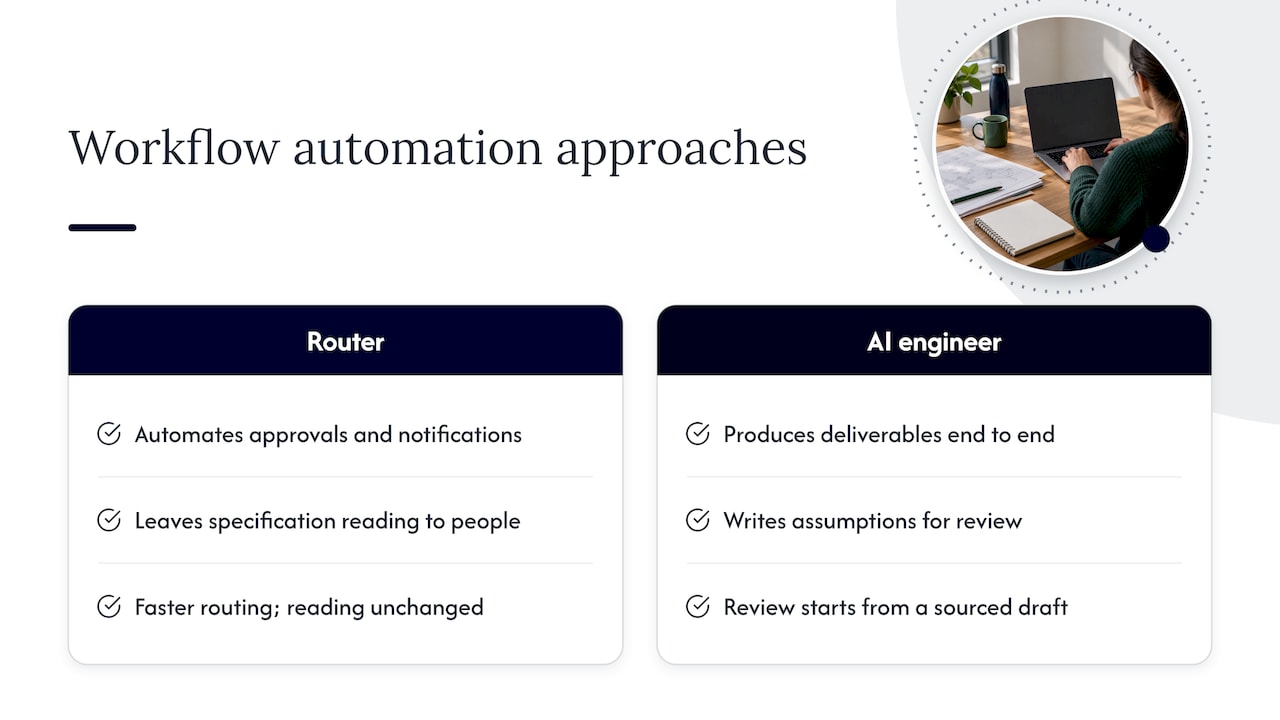
Most disappointing automation projects automate the first layer, leave the second to people, and then wonder why the saving is small. The routing was never the expensive part.
03
The anatomy of a dependable automated workflow
Datadog’s breakdown of workflow automation is a useful checklist even outside software operations. It identifies triggers that start a workflow, conditions and logic operators that control branching, actions that perform the steps, an execution environment that runs and monitors them, and audit logging that records step inputs, outputs, status, access roles and privileges.
The implication for engineering is direct. An automation that lacks explicit triggers, branching and logging is opaque, and an opaque process is unacceptable where a design decision carries professional liability. Each of the five elements has an engineering counterpart:
Element
What it means in an engineering workflow
Example
Trigger
The event that starts the work
A new drawing revision is uploaded; a tender package arrives
Conditions and logic
Rules that decide the path
If the revision changes a load-bearing element, route to the structural lead
Actions
The work itself
Extract quantities, check against a standard, draft a summary
Execution environment
Where the work runs and is monitored
A platform with status visibility and access roles
Audit log
Proof of what happened
Which sources were read, which assumptions were made, who approved
The last row matters most to owners and regulators. An engineer reviewing automated output needs to see the sources and the assumptions behind a number, in the same way a reviewer would ask a colleague how a figure was derived.
04
Where to start: Mapping before automating
The ACEC Technology Committee’s October 2025 primer on AI integration is blunt about sequence. Firms should perform detailed process mapping, assess the impact on roles and skills, document new standard operating procedures, provide training and establish governance before scaling. The order is not bureaucratic caution. A workflow that nobody has written down cannot be automated, only imitated badly.
A workable mapping exercise for one workflow takes a week or two and answers six questions:
What starts it? A request, a milestone, a submission, a date.
What goes in? Which documents, models, standards and data, and in which formats.
What comes out? The deliverable, who receives it and what they do with it.
Who touches it? Every handoff, including the informal ones that happen in email.
Where does it go wrong? Missed revisions, outdated standards, transcription errors, inconsistent units.
Who is accountable at the end? The named engineer whose signature the result carries.
The fifth question is the most productive. Rework and late-found errors are where the hours disappear, and they are exactly where automation, combined with systematic checking, earns its place. The sixth keeps the whole exercise honest: automation reassigns effort, not responsibility.
05
Which engineering workflows are worth automating
Not every task deserves the same treatment. The NAMC Central Texas Resource Center’s 2026 construction AI guide recommends beginning with low-consequence tasks: meeting summaries, email drafts, document indexes and internal checklist drafts. That is sensible for building confidence and habits. But the larger gains sit in document-heavy, high-volume work, and the sensible path is to graduate toward it.
Document control and submissions
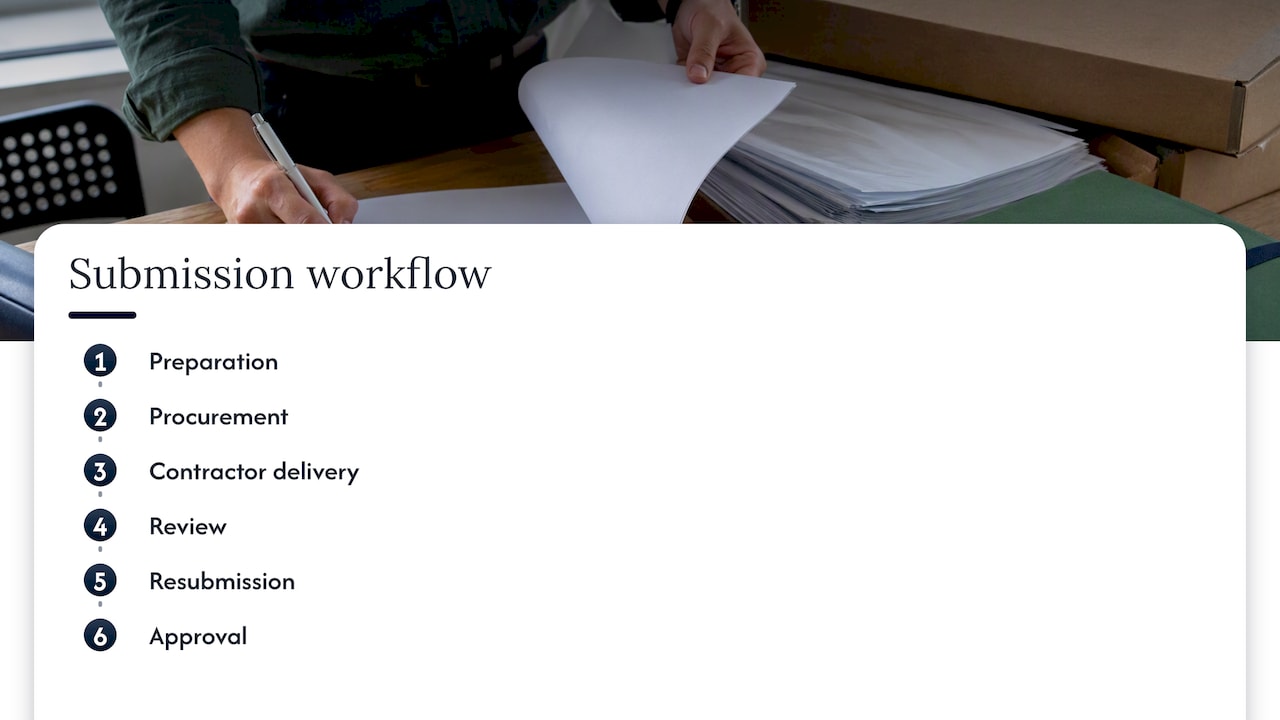
A common data environment combines electronic document management, workflow management and 2D/3D coordination. According to the Construction Industry Council’s CDE guide from Hong Kong, its customizable workflow supports submission and approval with review, markup and issue tracking. Transport for New South Wales documents a comparable sequence in its Digital Engineering Framework: preparation, procurement, contractor delivery, review, resubmission and approval. Both show that the skeleton of an engineering workflow is well understood. What remains manual is the reading and judging inside each step.
Compliance review
A 2026 pilot described by Project Value Delivery in mega oil and gas EPC projects combined rule-based engines and AI agents to check deliverables against specifications such as ASME, API and client standards, and to check interfaces between disciplines. Manual review effort fell significantly. The design is instructive: rules codify the standards and project design rules, while language models and agents extract information and assess context across documents. For a deeper treatment of how this works with BIM and what auditors expect, see our guide to engineering compliance checks.
Quantity takeoff and BIM
Takeoff is repetitive, measurable and error-prone, which makes it a natural candidate. It is also a task where a general-purpose model fails quietly: a chat assistant can describe a quantity schedule but cannot reliably build one from a model. The question to ask of any approach is whether it produces a number you can trace back to an element. Our note on AI for BIM and human sign-off covers where the review effort should remain.
Tender analysis
Comparing tenders means normalizing scope, currency, exclusions and assumptions before any price comparison is meaningful. Most of the time goes into making the numbers comparable, not into deciding. Automating that normalization and leaving the award decision to people shortens the cycle without moving accountability. Our page on tender document analysis goes into the details.
Quality assurance and reporting
QA/QC checklists, inspection records and daily logs are structured enough to automate and valuable enough to protect. Teams working to ISO 19650 and ISO 9001 need the record as much as the result, which is covered in our piece on audit-ready QA/QC automation. Reporting is a gentler entry point, as described in reporting automation for construction.
06
What stays with the engineer
The more capable the automation, the more precisely the boundary of human responsibility has to be drawn. ASCE advises firms to be discerning about digital systems, avoid over-reliance on black-box technology and keep human engineers at the center of their efforts. The Project Value Delivery experts make the same point in operational terms: AI output is a decision-support artifact, and engineers retain responsibility for final design decisions, compliance sign-off and interpretation of technical intent.
Two practices make that boundary concrete.
Confidence thresholds. The 2026 EPC pilot used thresholds on AI findings and required human verification for low-confidence results. The effect is a triage: clear passes and clear failures move quickly, and the ambiguous middle goes to a person with the evidence attached.
Written assumptions. Where a system makes a choice, such as which standard edition applies or how an unclear drawing note was read, the choice should be recorded where a reviewer can see it. A reviewer can then challenge the assumption instead of reverse-engineering the output.
07
Connecting automation to the systems you already run
Few firms can replace their document system, project management tool and model-authoring software at once, nor should they. The Federal Highway Administration’s return-on-investment brief on e-Construction describes automation as one part of a paperless delivery approach that combines mobile applications, automated workflows, collaboration tools and payment-system integration, with a PennDOT case study as the evidence. The lesson is that value arrives from connection, not from any single tool.
In practice, integration questions come down to a short list:
Can the automation read from the system where documents already live, without manual export?
Does it write results back, or does it produce a parallel set of files that someone must reconcile?
Are access roles inherited, so confidential project material stays confidential?
Is there a log of what was read and produced?
The ACEC adds a point that technology buyers often miss: success depends on a culture that promotes data literacy, encourages experimentation and rewards teams that use AI to improve processes. A tool nobody is allowed to be wrong with will not be used well.
08
Governance and security controls
The Hong Kong CDE guide lists controls that carry over to any automated engineering environment: secure access control, user-customizable submission and approval workflows, revision, status and authorization codes, and a full audit trail. It also suggests considering data-centre location where cybersecurity is a project concern. For organizations working across borders, that last point deserves attention, because the rules on where project data may sit differ by country and by client. Confirm the requirements for each jurisdiction and contract with the owner’s own security and legal teams.
A short governance checklist for any automated engineering workflow:
A named owner for each automated workflow, responsible for its rules and its output quality.
Defined exception paths: what happens when the input is missing, malformed or contradictory.
Role-based access and a record of who approved what.
A rule for which outputs always require engineer sign-off.
A review cycle for the automation itself, since standards and project requirements change.
09
Measuring whether it worked
Measurement is the weakest point in most programmes, because the baseline was never recorded. Before switching anything on, capture for one workflow: hours per cycle, number of review rounds, defects found late, and elapsed time from trigger to approved deliverable. After rollout, compare the same figures.
Published figures offer scale but should be read as one company’s estimate. AWS reports that ExxonMobil estimated its document platform could save at least 30,000 engineer-hours on a typical multibillion-dollar capital project, assuming 15,000 document reviews, and cut siloed-review error rates by 3 to 4 percent. Those numbers belong to a specific company, project size and review volume. Treat them as an illustration of how to express a business case, in hours per review and error rates, and not as a benchmark for your own work.
For Yesper’s own customers, the reported range is 50 to 95 percent time saved on projects, along with quality gains because errors that human reviewers missed are caught. The spread is wide for a reason: the saving depends on how document-heavy the workflow was to begin with.
10
Perspective: Why we built an engineer, not a router
We see the same pattern repeatedly. A company buys workflow software, automates approvals and notifications, and finds that the expensive hours are untouched, because those hours were spent reading a hundred pages of specification or reconciling a dozen tenders. Routing documents faster does not reduce the reading.
That is why Yesper is built as an AI civil engineer that works inside the project and produces deliverables end to end, rather than a chatbot that answers questions about them. It writes down its assumptions so that a reviewer can examine them as they would a colleague’s work. General frontier models can sound convincing on a simple task, but as complexity rises they hit a cliff: they cannot produce the geotechnical report from raw CPT protocols, the quantities from a BIM model, or one comparable set of numbers from tenders in three currencies. Domain depth is not a nicety here, it is the difference between a draft and a deliverable.
Our view of the human role is equally firm. Automation that removes the engineer’s accountability is a liability, and automation that removes the engineer’s drudgery is the point. Review stays human. What changes is that the review starts from a complete, sourced draft instead of a blank page. For more on this framing, read what an AI civil engineer is and our assessment of what actually works in AI for civil engineering.
11
Putting Yesper to work on the document-heavy steps
For contractors, consultancies and infrastructure owners whose hours disappear into reading, checking and compiling, Yesper covers project document search, regulatory compliance checks, quantity takeoff from BIM and drawings, deliverable creation, error detection and multi-step workflow automation, with customizable agents for different project roles and integrations with common tools. Companies such as AFRY, NRC Group and Netel use it across their organizations. To see how it works, book a demo.
12
A sensible rollout order
Putting the evidence together yields a sequence that most organizations can follow:
Map one workflow using the six questions above, and record the baseline.
Automate the low-consequence tasks to build habits and surface integration problems cheaply.
Move to one high-volume, document-heavy workflow, such as compliance review or takeoff, with explicit sign-off points.
Set confidence thresholds and exception paths so that ambiguity reaches a person.
Review the numbers against the baseline, then extend to the next workflow.
The future of AI in construction piece discusses how organizations turn early experiments into lasting project gains.
FAQ
What is engineering workflow automation?
It is the use of software, rules and increasingly AI agents to run the repeatable parts of engineering work: routing documents, checking designs, extracting quantities and drafting deliverables. The orchestration side follows rules and triggers, while the work side uses AI to read and interpret technical documents. Engineers remain accountable for the results.
Which engineering tasks should be automated first?
Start with low-consequence tasks such as meeting summaries, document indexes and checklist drafts, as the NAMC Central Texas guide recommends. Once the team trusts the process, move to document-heavy work with clear review points, such as compliance checks, takeoff and tender comparison.
Does automation replace engineering judgment?
No. ASCE advises keeping human engineers at the center, and practitioners describe AI output as decision support. Engineers validate findings, resolve ambiguities and approve final decisions, while automation handles the reading, extraction and first-draft work.
How do you measure the return?
Record a baseline before automating: hours per cycle, review rounds, late-found errors and time to approval. Compare the same measures afterward for the same workflow. Published case figures, like the ExxonMobil estimate, show how to frame the business case, but your own baseline is the only number that applies to your projects.
This post was written with AI assistance and published by Yesper. General information, not professional advice: requirements vary by project and jurisdiction, and the professional responsible for the project decides what applies. Spotted an error? Write to benjamin@yesper.ai.
Benjamin GlaserCo-founder at Yesper. Writes about AI and the industry that builds the world.benjamin@yesper.ai
Get news and articles in your inbox.
Unsubscribe anytime.
Yesper is the AI civil engineer for construction and infrastructure. AFRY, COWI, NRC Group and other Nordic firms use it to halve the time on a study, rerun calculations in minutes, and catch errors that would otherwise slip through. Get in touch if you'd like to see what it can do for you.