Protect daily logs: Pilot reporting automation for construction PMs

Reporting automation is worth adopting, but only when template enforcement and data governance arrive alongside it. On their own, software tools do not fix sloppy inputs. Paired with mandatory fields, a defined common data environment, and a short pilot, automation delivers measurable time savings, fewer errors, and contemporaneous records that hold up in disputes. What follows is a vendor-agnostic checklist for getting there.

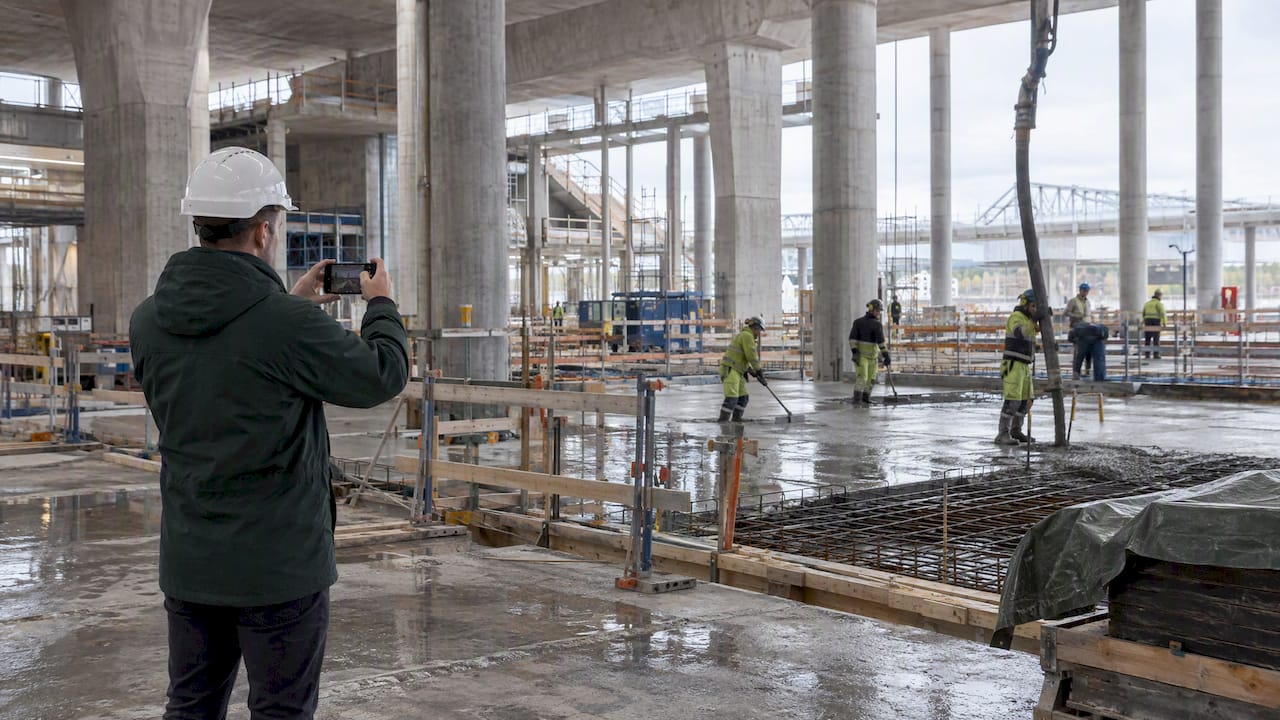
Superintendent documenting construction work on site
  • Enforcing templates and governance is essential for automation to reduce errors and provide defensible, audit-ready reports.
  • Starting with a pilot project for daily logs or weekly summaries helps measure time savings, data completeness, and error reduction.
  • Accurate data entry depends on mandatory, structured fields and assigning ownership to ensure ongoing quality control.
  • Integrating properly mapped systems and establishing clear governance policies prevent data failure points and privacy issues.
  • Automated daily logs are critical in disputes because they serve as trusted, contemporaneous evidence with higher legal weight.

What reporting automation actually means on a job site

Reporting automation replaces manual re-keying of field data into spreadsheets or templates with a system that captures information once and routes it into finished reports. Manual reporting typically means a superintendent writes notes on paper or a phone, then someone retypes them into a daily log template, then someone else copies cost figures into a separate tracker. Each handoff introduces a chance for error or delay.

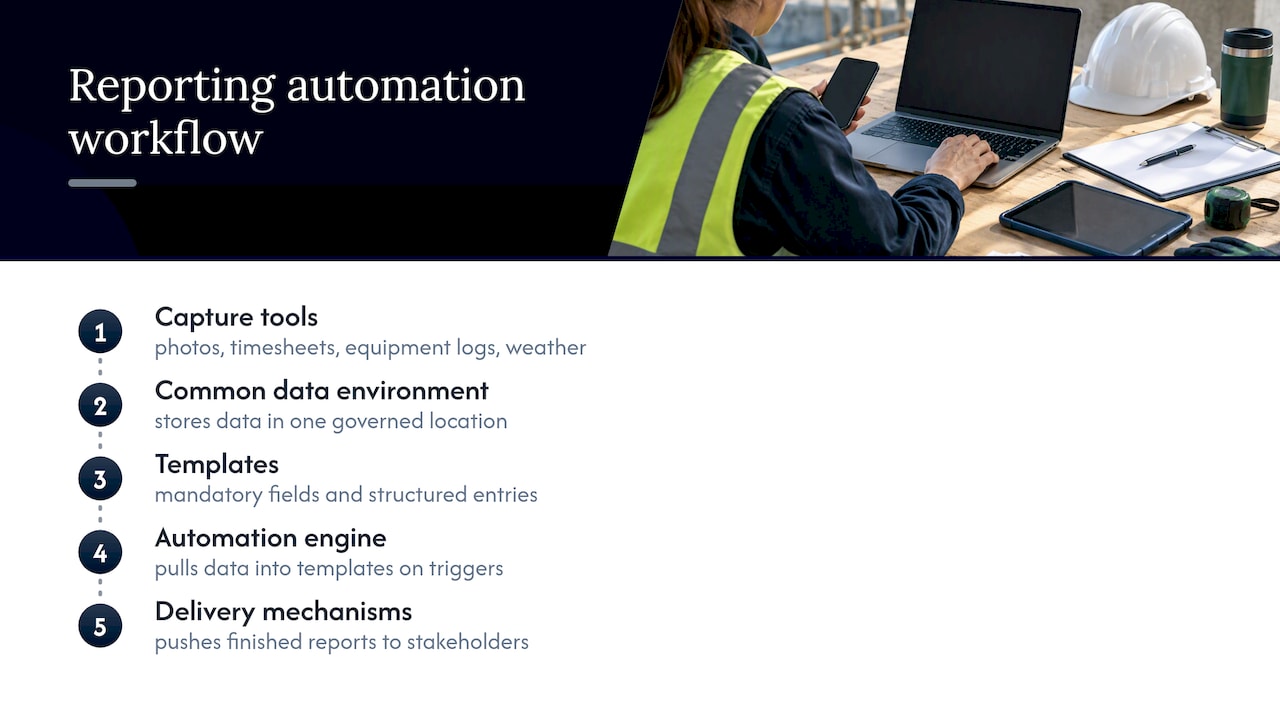
A working automated system has five core components. Capture tools collect field data: photos, timesheets, equipment logs, weather conditions, and crew counts. A common data environment, or CDE, stores that data in one governed location rather than scattered across inboxes and personal drives. Templates define what fields are mandatory and how entries are structured. An automation engine pulls captured data into those templates on a schedule or trigger. Delivery mechanisms then push finished reports to stakeholders, whether that is an owner’s representative, a project executive, or a subcontractor.

Five components of automated construction reporting

A simple mapping shows the shift: a crew foreman texting photos to an office assistant becomes a photo upload tied to a daily log ID. A Friday afternoon scramble to compile a monthly progress report becomes a scheduled pull from logged daily entries. The underlying work does not disappear, it moves earlier and becomes structured.

How data moves from the field into a finished report

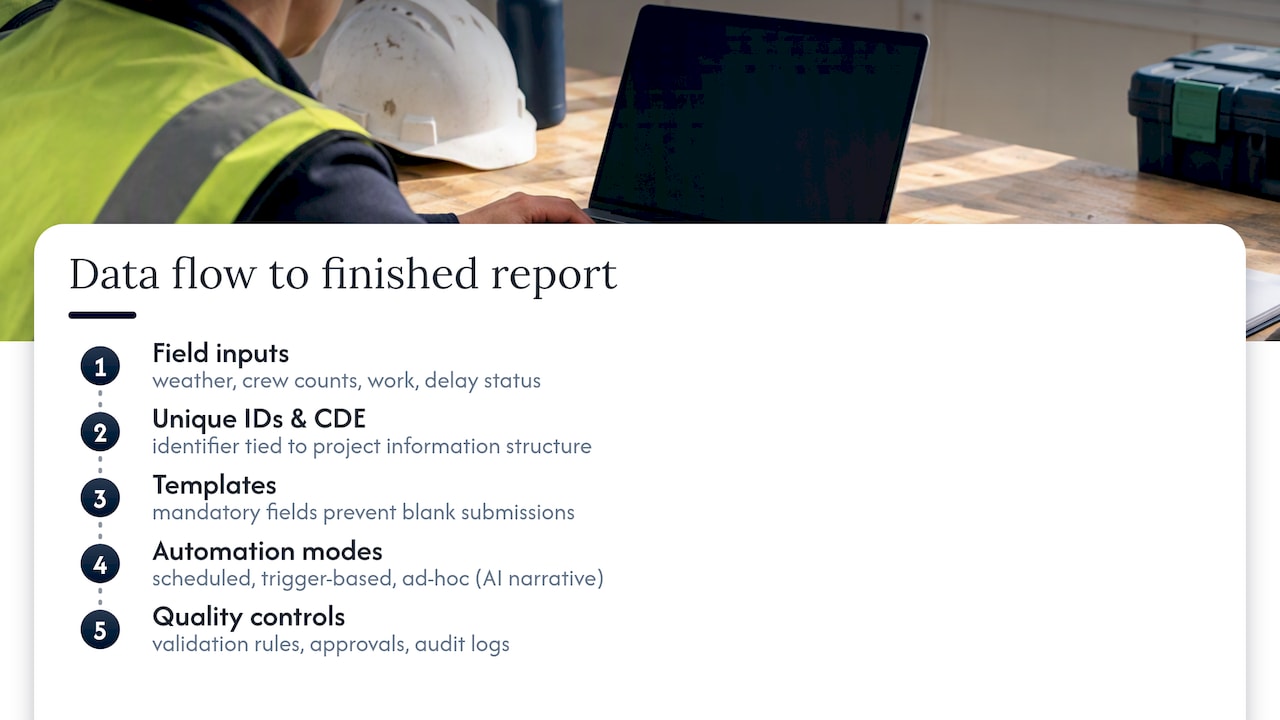
Automated reporting starts with field inputs feeding into the CDE, and the quality of that first step determines everything downstream. Practitioner guidance on daily site logging emphasizes logging weather, crew counts, completed work, and delay status every single day, since these four entries form the backbone of a defensible record. Each entry needs a unique identifier tied to the project’s information structure, a practice UK BIM guidance on common data environments treats as foundational to reliable information exchange.

Templates do the quiet work of consistency. A well-built template marks certain fields as mandatory, meaning a crew lead cannot submit a daily log without recording safety incidents or weather delays, even if nothing happened that day. This matters because the absence of an entry is itself information, and an automated system that allows blank fields produces reports with silent gaps.

Automation modes vary by report type. Scheduled automation runs on a calendar, generating a weekly progress summary every Monday morning regardless of who asks for it. Trigger-based automation fires when a condition is met, such as a safety inspection auto-compiling once a checklist is marked complete. Ad-hoc automation lets a project manager pull a report on demand, often with an AI-generated narrative summary stitched around the raw data points. The narrative layer matters because practitioner guidance on daily reports notes that written narrative entries, not just tables of numbers, often determine outcomes when a dispute lands in front of an arbitrator.

None of this works without quality controls. Validation rules catch obviously wrong entries, such as a crew count of zero on a day photos show twenty workers on site. Approval workflows require a supervisor to sign off before a report locks. Audit logs record who changed what and when, which becomes essential if a report is ever challenged.

How data moves from the field into a finished report — overview diagram

Common reports to automate first and why each one matters

Not every report deserves the same priority. Some carry legal and financial weight far beyond their length, and those are the ones worth automating before anything else.

  • Daily reports and daily logs serve as the primary contemporaneous evidence in disputes, and CMAA guidance on daily reporting notes that the party with the most complete, timestamped documentation usually prevails.
  • Weekly and monthly progress summaries give owners and executives a consistent view of schedule status without requiring them to read raw field notes.
  • Job-cost and earned-value snapshots connect field activity to budget consumption, catching cost overruns while there is still time to act.
  • Safety inspections with photo-backed checklists create a defensible trail showing that hazards were identified and addressed, not just noted after an incident.
  • Submittal and RFI status reports track the paperwork that often causes the worst schedule delays when it sits untracked in someone’s inbox.

Daily logs deserve particular attention because they are read most often after something has already gone wrong, when the only question that matters is what was known and when.

Why accuracy, time, and defensible records change the business case

Re-keying data by hand is where most reporting errors originate, and automation removes that step entirely by capturing information once at its source. A number typed into a timesheet app does not need to be retyped into a spreadsheet and then again into a monthly report, each transcription a fresh chance for a typo that throws off a job-cost calculation.

Time savings compound across a project team. Site superintendents spend less time compiling notes into formatted documents, and office staff spend less time chasing down missing entries before a Friday deadline. That time moves toward actual project oversight instead of clerical assembly.

The compliance and dispute value is harder to quantify but often matters more. CMAA’s guidance on daily reports frames documentation as the deciding factor in claims and disputes, and contemporaneous records carry particular weight. Under Federal Rule of Evidence 803, business records made at or near the time of the event carry an exception to hearsay rules specifically because they are considered more reliable than reconstructed testimony. A daily log entered the same day a delay occurred is simply worth more in a courtroom than a recollection assembled months later.

Faster, more consistent reporting also changes how stakeholders make decisions. An owner’s representative who receives a reliable weekly summary can approve change orders or adjust schedules without waiting on a special request, which keeps projects moving instead of stalling on information gaps.

Step-by-step implementation checklist from audit to scale

A rollout that skips the audit step tends to automate whatever bad habits already exist. The sequence below keeps risk low and makes success measurable.

  1. Audit current reporting. Document what gets collected today, who owns each report, and where the data physically lives, whether that is a shared drive, a foreman’s phone, or a paper binder in a site trailer.
  2. Pick one pilot report. Daily logs or weekly progress summaries work well as a starting point because they are frequent enough to generate fast feedback and important enough to matter.
  3. Define success metrics before starting. Time saved per report, percentage of mandatory fields completed, and error rate compared against the old process are concrete, measurable targets.
  4. Design lean templates. Mandatory fields should be short and structured rather than open paragraphs, since structured entries are what automation engines can actually process reliably.
  5. Map integrations and assign data owners. Identify which systems feed the pilot report, whether that is a scheduling tool, a timesheet app, or a photo repository, and name one person accountable for each feed.
  6. Set up CDE naming and unique IDs. Follow a structure consistent with ISO and UK BIM common data environment guidance so that every entry can be traced back to its source without ambiguity.
  7. Run the pilot for two to eight weeks. This window is long enough to surface recurring problems without committing the whole organization to an unproven process.
  8. Measure, iterate, and then scale. Compare pilot results against the success metrics set in step three, adjust templates or field entry habits as needed, and only then expand to additional report types or project teams.
  9. Train crews and set enforcement reminders. A template with mandatory fields only works if crews actually fill it out consistently, which usually requires short, repeated training rather than a single onboarding session.
  10. Schedule ongoing QA and owner checks. Assign someone to periodically review a sample of reports for completeness and accuracy, since automation does not eliminate the need for oversight, it relocates it.

Pro Tip: Start the pilot on a single project or crew rather than the whole portfolio, so a bad template design costs you two weeks instead of two quarters.

Before mapping integrations in step five, it helps to sequence the underlying system work so data actually arrives where the automation engine expects it.

Integrations and governance decisions to plan around

Automated reporting pulls from several systems at once: scheduling software, ERP or job-cost platforms, timesheet apps, BIM models, photo repositories, and sometimes equipment telematics feeds. Each integration point is also a potential failure point if data formats or update frequencies do not match.

Governance decisions matter as much as the technical connections. ISO and UK BIM common data environment guidance ties information exchange requirements, or EIRs, to a defined CDE structure, which gives automated reports a consistent backbone rather than an ad hoc patchwork. Access controls, data retention policies, and photo or drone footage privacy rules should be settled before rollout, not after a complaint arrives. A common pitfall is connecting a system before anyone has agreed on who owns the data it produces, which creates confusion the first time a number looks wrong. For teams managing submittals and compliance documentation across multiple integrations, a structured compliance matrix built from tender documents keeps requirements traceable as more systems get connected.

What a purpose-built AI civil engineer brings to the checklist

Some platforms are built specifically for construction and infrastructure workflows rather than adapted from general-purpose tools. Yesper is one example, an AI civil engineer used by thousands of people at companies in the Nordics and Europe. It produces deliverables end-to-end from scratch and writes down its assumptions for review, a process meant to mirror how a human colleague’s work gets checked rather than treated as a black box.

Customers report 50 to 95 percent time saved on projects, with higher quality attributed to the system catching errors that human reviewers missed. That range illustrates why the checklist above matters regardless of which platform a team chooses: the governance and template work done before automation starts is what determines whether those gains materialize.

When evaluating any vendor, measure the same metrics recommended earlier, time saved, field completeness, and error rate, and keep a human sign-off step in place during early rollout. Governance does not disappear once a platform is selected, it shifts toward overseeing the automation rather than performing the manual work it replaces.

Where automation efforts commonly go wrong

Inconsistent or incomplete field entry undermines automation faster than any software limitation, so enforce mandatory fields and keep structured inputs short. Governance drift sets in when no one owns the data after the initial rollout excitement fades, which is why assigning a QA cadence matters. Photo and drone footage raise privacy questions that should be settled with clear policy before rollout, not improvised afterward. Automating a bad process just produces bad reports faster, so keep a human sign-off step during the early months rather than trusting the system blindly.

The bottom line on automating construction reporting

Automation earns its keep when template enforcement and governance are built in from the start, not bolted on afterward. The practical next step is a focused pilot, daily reports or weekly progress summaries work well, with success metrics defined before the first report runs. Expect measurable ROI to develop over months rather than days, and treat the pilot’s data as the evidence that justifies scaling further.

A construction PM’s take on what actually protects you

Templates and dashboards get the attention, but the daily log is what wins or loses a dispute. A delay claim rarely turns on a progress chart, it turns on whether someone wrote down the weather, the crew count, and the reason work stopped on the day it happened. Automation is worth pursuing because it makes that habit easier to sustain, not because it replaces the habit itself. Pilot small, measure honestly, and scale only what the data supports.

An automation path built specifically for construction teams

Most reporting tools were built for generic office workflows and retrofitted for job sites, which shows up in rigid templates and shallow integrations. We built our platform differently: Yesper is purpose-built for construction and infrastructure work, and it understands the regulations and document structures this industry runs on rather than treating them as an afterthought.

Where the checklist above calls for integrations, deliverable generation, and assumption tracking, our platform handles each directly. It connects with existing project management systems, produces reports and other deliverables end-to-end, and writes down its assumptions at every step so you can review its work the same way you would review a colleague’s. For teams ready to see how a domain-specific platform fits alongside the governance practices in this guide, our company overview walks through how the platform approaches construction work end to end.

How can I automate the reporting process?

Start by auditing your current reports to identify what data you collect and where it lives, then pick one report type, such as daily logs, to pilot first. Build lean templates with mandatory fields, connect your core data sources, and run a short pilot of two to eight weeks before expanding to other report types.

What are some examples of automation in construction?

Common examples include scheduled daily log compilation from field photos and timesheets, automated weekly progress summaries pulled from logged entries, and safety inspection checklists that trigger a compiled report once completed. Job-cost tracking that pulls directly from timesheets and purchase orders is another frequent starting point.

What are the best report automation tools?

The right tool depends on whether a team needs general document automation or construction-specific functionality that understands regulatory and project structures. Purpose-built platforms like Yesper focus specifically on construction and infrastructure workflows, producing deliverables end-to-end with assumptions documented for review, which differs from generic office automation software adapted for site use.

What is automation in construction?

Automation in construction refers to using software to capture field data once and route it into finished deliverables, such as reports, schedules, or compliance documents, without manual re-entry at each step. It spans everything from daily reporting to quantity tracking, with the common goal of reducing repetitive manual work while improving consistency.

Why do daily reports matter more than other automated documents?

Daily reports serve as the primary contemporaneous evidence used when disputes arise, since records made close to the event they describe carry more weight than information reconstructed later. The party with the most complete and consistent daily documentation typically has the stronger position in a claim.

This post was written with AI assistance and published by Yesper. General information, not professional advice: requirements vary by project and jurisdiction, and the professional responsible for the project decides what applies. Spotted an error? Write to benjamin@yesper.ai.

Benjamin Glaser Co-founder at Yesper. Writes about AI and the industry that builds the world. benjamin@yesper.ai

Yesper is the AI civil engineer for construction and infrastructure. AFRY, COWI, NRC Group and other Nordic firms use it to halve the time on a study, rerun calculations in minutes, and catch errors that would otherwise slip through. Get in touch if you'd like to see what it can do for you.

Book demo