Map systems first to cut billing lag: Construction software integrations
Integrate field capture tools and project management software into the ERP so accounting remains the single source of financial truth, then choose an architecture that matches your stack’s size. Small operations with a few core tools can survive point-to-point connections; anyone running more should adopt a hub or iPaaS model. The first move is not a vendor purchase. It’s a systems ownership map, followed by a pilot on whichever workflow burns the most hours: time-to-invoice or labor-to-cost reconciliation.
Benjamin Glaser
19 September 2026 · 15 min read
In short
Integrating field apps, project management, and ERP systems reduces duplicate data entry and shortens billing cycles by enabling real-time job cost visibility.
Hub-and-spoke or event-driven architectures are preferable for larger setups, simplifying maintenance and improving reliability over point-to-point connections.
Clear ownership of data fields and consistent identifier mapping prevent reconciliation issues and data drift during integration.
Prioritize automating high-frequency, high-impact tasks like invoicing and job costing, while using staged rollouts and testing to minimize disruption.
Use an AI civil engineer like Yesper for the document-heavy work underneath an integration: quantities from models, requirement cross-checks, and catching mismatched codes in project data.
01
Why construction software integrations matter to your bottom line
Every hour a project engineer spends retyping field data into an accounting system is an hour not spent catching a cost overrun. Construction software integrations exist to close that gap. When a field app, a scheduling tool, and an ERP talk to each other automatically, billing cycles shorten because job costs post as work happens, not two weeks later during a frantic month-end close.
The upside shows up in a few predictable places:
Fewer duplicate entries between field apps, project management software, and accounting
Faster invoice turnaround because cost data doesn’t wait for manual reconciliation
Real-time job cost visibility that lets project managers catch budget drift mid-phase, not after closeout
Pro Tip:Before connecting anything, audit your cost code structure. An integration will move bad data just as efficiently as good data, and it will do it faster than your staff ever could.
That warning matters more than it sounds. Teams that skip standardizing cost codes, vendor IDs, and project numbers before integrating often find their reconciliation problems multiply rather than shrink, because errors that used to get caught by a human retyping the numbers now flow straight through.
02
Integration architectures and patterns: Which to pick and why
Three architectural patterns dominate construction software integrations, and picking the wrong one for your scale creates more work than it saves.
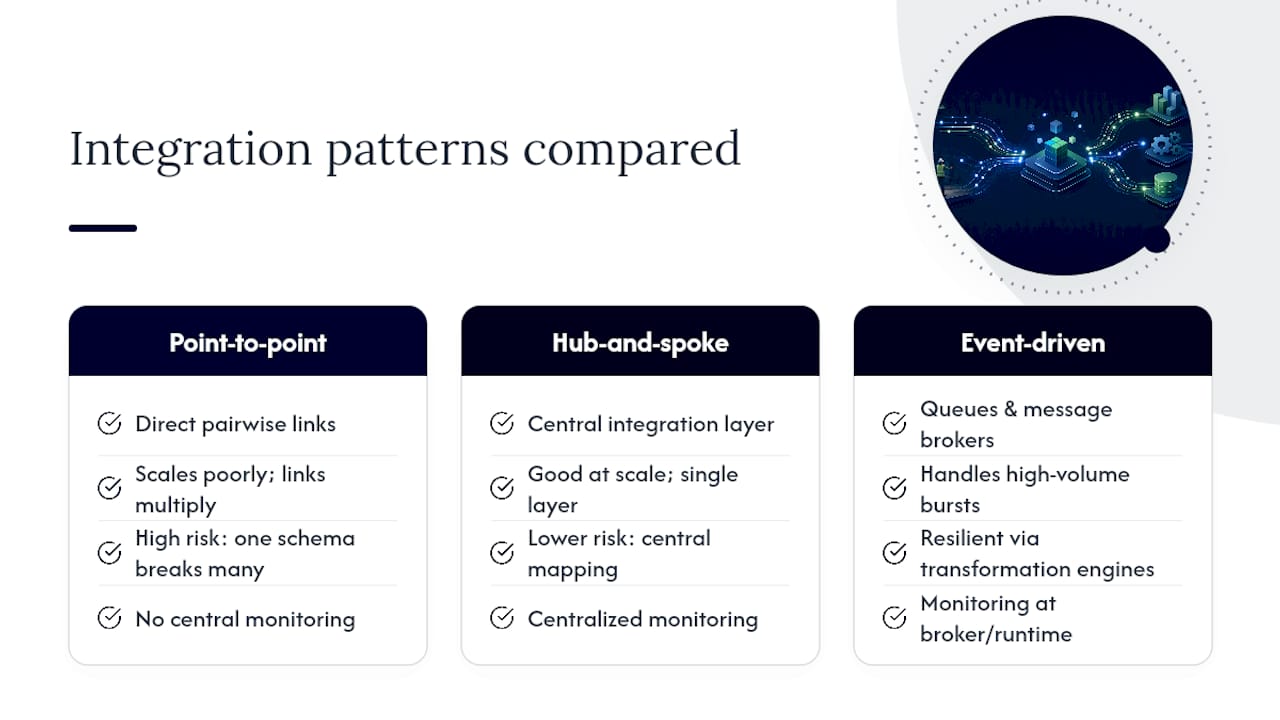
Point-to-point connections link two systems directly. They’re fast to set up and fine for outfits running a handful of tools, say, one ERP and one field app. The problem surfaces at scale: every new tool multiplies the number of connections you have to maintain, and a schema change in one system can silently break three others.
Hub-and-spoke, or iPaaS, models route every connection through a central integration layer that owns authentication, transformation, and monitoring. A centralized integration layer that enforces consistent identifier mapping reduces duplicate entry and gives operations leads one place to watch data move across the project lifecycle, rather than chasing failures across a dozen point-to-point links.
Event-driven architectures use queues and message brokers instead of direct calls, which matters when field connectivity is unreliable. This pattern handles offline-first conditions and high-volume data better than either alternative: queued events absorb the burst when a crew comes back online after a day without signal. Construction-specific examples exist, such as event-driven runtimes with transformation engines that normalize cost codes and field names between systems.
The signal to move from point-to-point to a hub: you’ve connected more than three or four systems, or a single schema change now requires touching multiple integrations to fix.
03
Deciding data ownership: Rules to avoid conflicts and drift
Every integration conflict traces back to the same root cause: two systems both claiming to be right about the same field. Assign ownership before you write a single API call.
The ERP owns financials. Costs, invoices, and payroll postings originate there and flow outward. No other system should be allowed to overwrite a financial figure.
The project management system owns schedule. Task sequencing, milestones, and float belong to the PMS, not the field app or the ERP.
Field apps own raw capture. Daily logs, time entries, and material receipts start as unverified data from the field and get validated before they become financial or schedule records.
Map identifiers once, consistently. Project codes, cost codes, and vendor IDs need a single crosswalk table, not five different naming conventions across five systems.
Allow bidirectional sync only where it’s safe. Status updates can flow both ways; financial totals should flow one way, from the system of record outward.
This structure prevents the classic failure mode where a field crew updates a cost code in one app, the ERP never sees it, and the discrepancy surfaces three weeks later at reconciliation.
04
Common integration scenarios and a simple prioritization rule
Not every possible connection deserves a place in your rollout plan. Rank candidates by pain times frequency times risk, and the list sorts itself.
Time-to-invoice automation. Connecting field time entries directly to billing cuts the lag between work performed and revenue recognized, often the single highest-value integration on the list.
Labor-to-cost reconciliation. Automating the flow from timekeeping into job costing eliminates one of the most repetitive manual tasks in construction accounting.
Purchase order automation. Linking procurement to the ERP closes the loop between committed costs and actual spend, reducing budget surprises.
BIM handoffs and quantity takeoff. Feeding model data into estimating and procurement tools is a strategic extension rather than a quick win, but it pays off on repeat project types.
Score each candidate on how much pain it currently causes, how often it recurs, and how much risk a failure carries. A monthly report that takes an afternoon to compile ranks lower than a daily reconciliation task that eats two hours every single day.
05
Technical guardrails: APIs, webhooks, and offline sync
The technical choices underneath an integration determine whether it survives contact with a job site. Field data, collected on spotty connections by people who are not thinking about your data model, behaves differently than a clean financial transaction pushed from a desktop.
For field data, asynchronous messaging or webhooks generally outperform synchronous APIs, because a crew’s phone won’t wait around for a server response before moving to the next task. Financial operations, by contrast, often need the certainty of a synchronous API call, since a payment or invoice posting has to confirm success before the workflow continues.
Assign a unique transaction ID to every record so a retried sync never creates a duplicate entry, a concept known as idempotency.
Design for offline-first capture, with a defined conflict resolution rule for when two edits to the same record arrive out of order.
Build retries with exponential backoff rather than immediate resubmission, which avoids hammering a system that’s already struggling.
Log every failed sync with enough context to diagnose it without reproducing the error live.
Pro Tip:Test your offline sync by turning off a field tablet’s connectivity for a full shift, then reconnecting it. If the reconciliation logic can’t handle a full day of queued changes, it won’t survive a real job site.
06
Testing, staged rollout, and keeping integrations honest
Sandbox testing against non-production data to confirm field mappings behave as expected.
Pilot on one project, ideally the workflow you identified as highest pain times frequency, and run it in parallel with the manual process for at least one billing cycle.
Phased production rollout across additional projects only after the pilot’s reconciliation numbers match.
Once live, monitor sync success rates, failed transaction counts, and mapping errors daily rather than monthly. Reconciliation checks that compare totals between the ERP and the source system on a set schedule catch data drift before it compounds. A checklist that runs from discovery through monitoring and reconciliation gives operations leads a repeatable structure instead of reinventing rollout steps for every new connector.
07
Where domain-specific AI fits into integration-heavy workflows
Mapping fields between a BIM model, a scheduling tool, and an ERP is tedious, specialized work, and it’s exactly where construction-specific AI earns its place. Extracting quantities from a BIM model, reconciling cost codes between a field export and the accounting structure, or building a compliance matrix out of a stack of tender documents are jobs that reward a tool built for construction over a general-purpose assistant.
Yesper is built as an AI civil engineer for this kind of document-heavy, structured work, and it works alongside existing project systems rather than replacing them. Practical jobs suited to this kind of assistance include:
Pulling a bill of quantities straight from an IFC model instead of manual takeoff
Cross-checking tender documents against regulatory requirements before submission
Flagging mismatched cost codes or vendor IDs across project documents and exports before they cause a reconciliation failure
Set realistic expectations: AI assistance speeds up mapping and QA, but source-of-truth rules and staged rollout discipline still apply. Read more on what an AI civil engineer actually does before assuming it replaces integration planning rather than supporting it.
08
Common connector targets across the construction stack
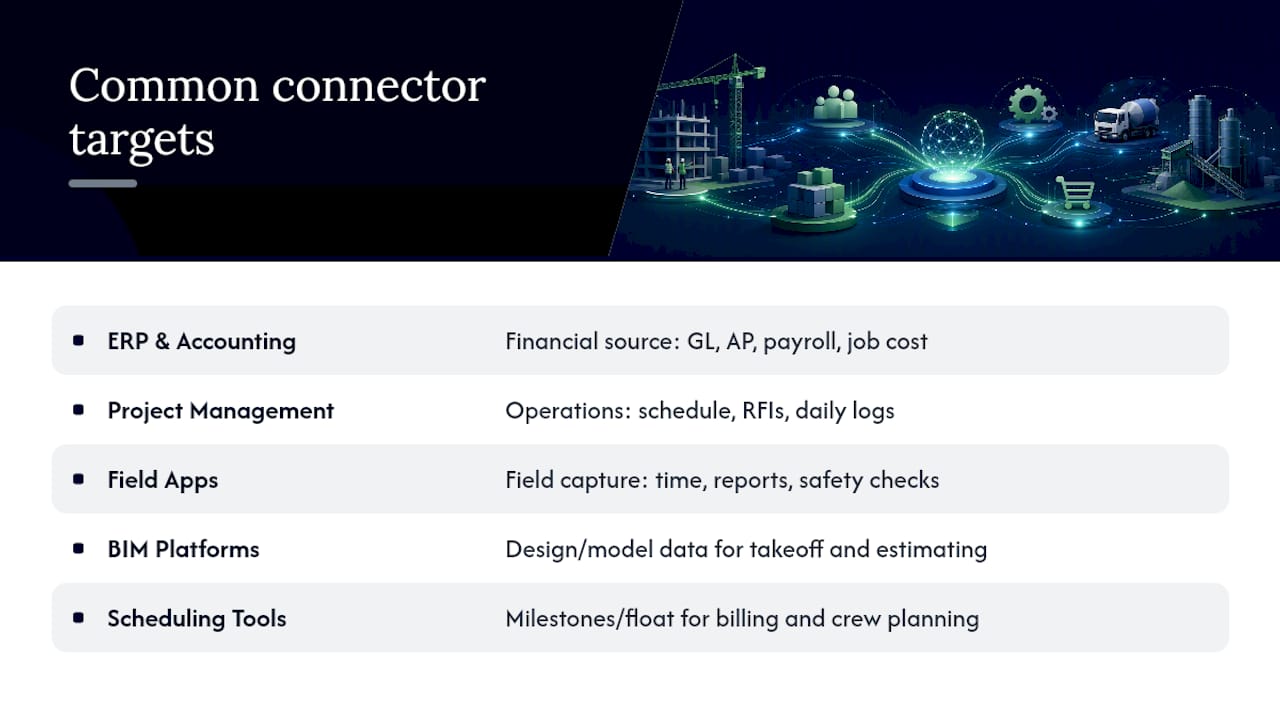
Five categories of software show up in nearly every construction integration project, and each plays a distinct role in the data flow.
ERP and accounting platforms anchor the financial side: general ledger, accounts payable, payroll, and job costing all live here. This is the system that should never be overwritten by an upstream tool.
Project management software tracks schedule, submittals, RFIs, and daily logs. It’s the operational heartbeat of a job, and it needs to feed cost and schedule data into the ERP without becoming a second financial ledger.
Field apps, covering time tracking, daily reporting, and safety checklists, capture data at the point of work. This is the noisiest data source in the stack, since it’s entered quickly, often on a phone, by people focused on the job rather than the data model.
BIM platforms hold design and model data that feeds estimating, procurement, and quantity takeoff. Getting a bill of quantities out of a model automatically, rather than through manual measurement, is one of the higher-value integrations available to teams running design-build or design-assist work.
Scheduling tools, whether standalone or bundled into a PMS, need to sync milestone and float data into both the ERP for billing schedules and field apps for crew planning. Large connector ecosystems and real-time job cost visibility are genuine buyer priorities, but the actual value depends on how disciplined your data ownership rules are underneath the connection.
09
Security and data privacy considerations in construction software integrations
Every integration adds a new pathway for sensitive data to move, and construction data carries specific risk: payroll figures, vendor pricing, contract terms, and safety incident reports all cross these connections routinely.
Authentication should run through OAuth or API keys scoped to the minimum permissions each connector needs, not a shared admin credential reused across every integration. A field app that only needs to write time entries should never hold read access to payroll data.
Audit trails matter more in construction than in many industries, because disputes, change orders, and regulatory audits routinely require proof of what data existed when. Keeping the audit trail intact as data crosses systems supports both quality assurance and compliance. In the UK this is the “golden thread” of information that the Building Safety Act requires from design through construction.
Encrypt data in transit and at rest, particularly for financial fields moving between the ERP and any middleware layer. Review third-party connector permissions on a schedule rather than granting access once and forgetting about it. If you’re using a hub or iPaaS platform, confirm where it stores data at rest and for how long, since some middleware retains copies of transaction payloads for troubleshooting purposes that your data retention policy may not account for.
Finally, treat integration credentials the way you’d treat any financial system password: rotate them, restrict who has access, and revoke access immediately when a connector is decommissioned or a vendor relationship ends.
10
Best practices for change management and user training during integrations
The technical build is often the easier half of an integration project. Getting a superintendent who has logged time on paper for fifteen years to trust an automated sync is the harder problem, and it’s the one most rollout plans underestimate.
Start training before the integration goes live, not after. Field staff need to see the new workflow in the sandbox environment and understand specifically what changes for them, whether that’s a new field on a time entry form or a different approval step for change orders.
Identify a champion on each project team, someone who understands both the old manual process and the new automated one, and give them enough visibility into the integration’s status to answer questions without escalating every issue to IT. This single role prevents most of the informal workarounds that quietly break data integrity.
Run the new integrated process in parallel with the old manual one for at least one full billing cycle. Comparing the two side by side gives finance teams confidence the automated numbers match reality before they cut over completely, and it gives field staff a safety net if something doesn’t sync correctly.
Communicate what will not change as clearly as what will. Crews resist new systems less when they understand their daily routine is barely affected, even if the backend data flow changed entirely. Document the new process in plain steps, not technical architecture diagrams, since the people executing it daily don’t need to know how the API works, only what button to press.
11
Common challenges and how to troubleshoot integration issues
Most integration failures fall into a short list of repeat offenders, and recognizing the pattern speeds up the fix considerably.
Inconsistent cost codes or project numbers cause the majority of reconciliation mismatches. When the ERP and the field app use slightly different naming conventions for the same project, costs post to the wrong bucket, and nobody notices until the monthly report doesn’t add up. The fix is a single crosswalk table maintained in one place, not five spreadsheets across five departments.
Duplicate entries from failed retries happen when a sync fails, gets retried, and the receiving system has no way to recognize it already processed that transaction. This is precisely what idempotent transaction IDs solve, and its absence is one of the most common technical oversights in early-stage integrations.
Silent sync failures are worse than loud ones. An integration that fails without alerting anyone can run broken for weeks before someone notices the numbers look off. Set up alerting on failed transactions immediately, even before the integration goes fully live.
Schema drift, where a vendor updates their API and a field that used to exist gets renamed or removed, breaks connections without warning. Monitoring for unexpected null values or missing fields catches this faster than waiting for a user complaint.
When troubleshooting, always start by comparing timestamps and transaction IDs between the two systems before assuming the logic is wrong. Most issues turn out to be a mapping error or a timing mismatch, not a fundamental architecture problem.
12
Where integration projects actually fail
The integrations that fail rarely fail on the API call. They fail because nobody owned the cost code standard, because acceptance testing skipped edge cases like a crew working across two projects in one day, or because a rollout went live everywhere at once instead of on one pilot project first. Budget three to six months for a meaningful integration, longer if you’re touching payroll. Bring in an external integration partner once you’re past two systems and a hub architecture, not before. If any of this sounds like more operational discipline than your team currently has, that’s worth knowing before you sign a contract, not after.
13
How Yesper supports teams building out their integration stack
Yesper takes on the document work that sits underneath every construction software integration project. It is not an integration platform. It works as an AI civil engineer built for construction documents, capable of pulling quantities from a BIM model, cross-referencing tender requirements, and flagging errors in project data before they turn into reconciliation headaches.
Teams typically start with a demo focused on a specific workflow, begin on one project, and expand from there once the numbers check out, the same staged approach this guide recommends for any integration. Some companies already use Yesper across their organizations for exactly this kind of document-heavy, high-stakes work.
If you’re mapping out where AI-assisted work fits into your own integration roadmap, this overview is a reasonable place to see what Yesper actually does before you plan your own rollout.
Most construction companies run a combination of an ERP or accounting platform, a project management system, and one or more field apps for time tracking and daily reporting. Larger firms add BIM software and dedicated scheduling tools, then connect all of it through construction software integrations rather than relying on staff to move data manually between systems.
What are integrations in software?
Software integrations are connections that let two or more applications share data automatically instead of requiring someone to re-enter it in each system. In construction, that typically means field data flowing into project management software and financial figures syncing into the ERP without manual double entry.
What is the best ERP for construction?
There is no single best ERP for every construction business. The right choice depends on company size, project types, and existing tools, but the ERP should always remain the system of record for financials regardless of which platform you choose, since that’s the rule that keeps job costing and billing accurate across every other connected system.
What is the best software for construction design?
BIM platforms handle design and modeling, and the best choice depends on project complexity and whether your team needs clash detection, quantity takeoff, or coordination across multiple disciplines. What matters more than the platform itself is whether it integrates cleanly with your estimating and procurement tools, since a model that can’t feed a bill of quantities into downstream systems loses much of its value.
This post was written with AI assistance and published by Yesper. General information, not professional advice: requirements vary by project and jurisdiction, and the professional responsible for the project decides what applies. Spotted an error? Write to benjamin@yesper.ai.
Benjamin GlaserCo-founder at Yesper. Writes about AI and the industry that builds the world.benjamin@yesper.ai
Get news and articles in your inbox.
Unsubscribe anytime.
Yesper is the AI civil engineer for construction and infrastructure. AFRY, COWI, NRC Group and other Nordic firms use it to halve the time on a study, rerun calculations in minutes, and catch errors that would otherwise slip through. Get in touch if you'd like to see what it can do for you.