An AI training plan for construction teams, step by step

An AI training plan for a construction company is a sequenced program that teaches each role which AI tasks to run, which data it may touch, how to verify the output and who signs off, then measures whether project work actually improved. A slide deck on prompts does not qualify. The plan below covers assessment, role-based content, safeguards, delivery and measurement, and it is written for contractors, consultancies and owners who want AI in daily project work rather than in a workshop folder.

Engineers checking an AI output against its source

TL;DR

  • Start with a survey of current AI use, literacy and concerns, then group staff into personas so the training matches what each person does on a project.
  • Train by role: site supervisors, estimators, project managers, engineers and executives need different competencies and different assessments.
  • Make verification and data handling the core curriculum: approved tools only, check outputs against originals, and keep a qualified person accountable for estimates, contract readings and safety plans.
  • Begin with one workflow, expand when quality and capability justify it, and track outcome metrics such as task completion and review rates instead of course attendance.
  • Treat training as continuous: tools, rules and project data change, so the plan needs an owner and a review cycle.

Why training, not tooling, is the bottleneck

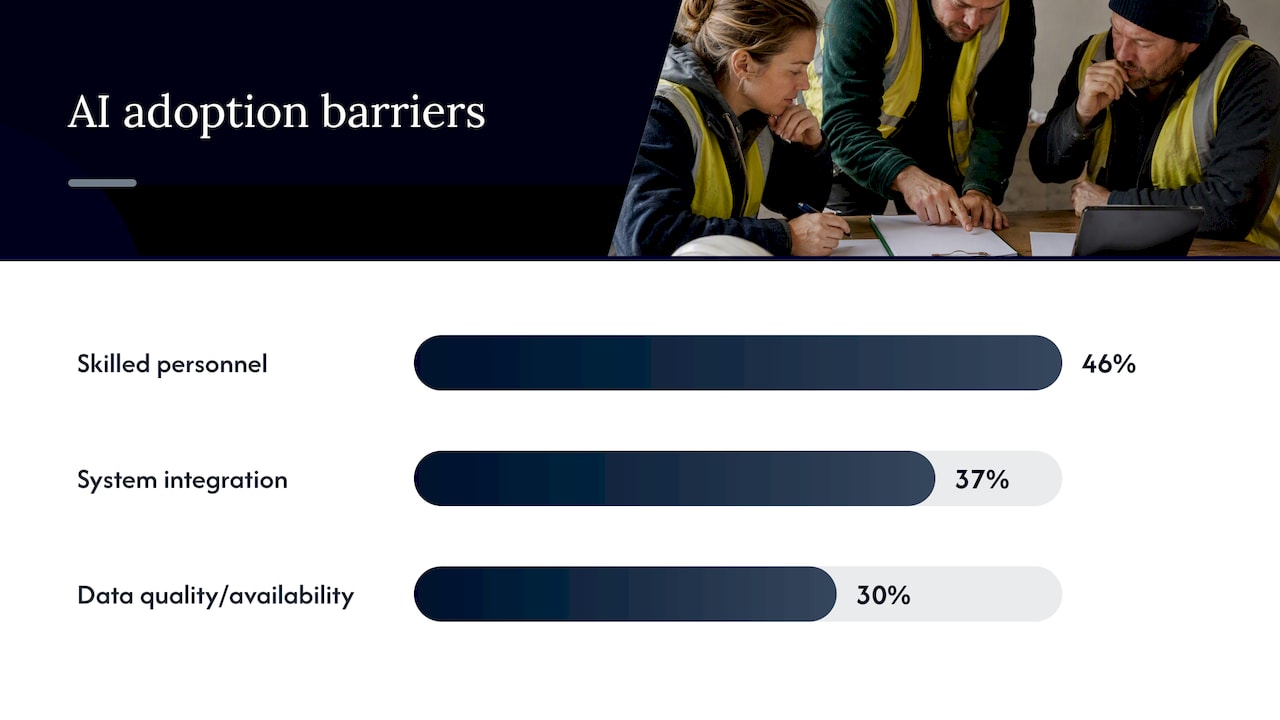
Most construction firms that struggle with AI did not pick the wrong software. They skipped the part where people learn what the software is for. RICS’s 2025 global construction report lists the most cited barriers to AI adoption as lack of skilled personnel (46%), integration with existing systems (37%) and data quality and availability (30%). Two of those three are problems that training and governance address directly; the third, integration, is easier once people know which workflows they want connected.

Three construction AI adoption barriers by percentage

The pattern is not unique to one country. A 2025 study of 97 construction professionals in Spain found the primary obstacles to digital tool adoption were lack of digital skills at 35%, insufficient budget at 30% and high tool costs at 25%. In the UK, the Department for Science, Innovation and Technology found that construction upskilling is often driven by trial and error rather than structured training, which produces uneven quality and limited governance. The same research points to fragmentation, heavy subcontracting and low digital maturity as reasons why consistent training is both more necessary and harder to deliver in this sector than in most.

The practical reading: a company that lets each estimator and engineer experiment alone will end up with five different habits, no shared rules and no way to tell which outputs were checked. A written plan fixes that before the first tool is rolled out widely.

What an AI training plan has to achieve

A useful definition: training should build staff capability, give people reliable project information to work from, and include real practice, while keeping staff accountable for their own work. Strip that down and you get four outcomes the plan must deliver:

  1. Capability. People know which tasks AI handles well, which it handles badly, and how to phrase and structure a request.
  2. Reliable inputs. The drawings, specifications, schedules and cost data the AI reads are current, organized and permitted for use.
  3. Habit. AI is part of the routine, such as drafting the daily report or screening a tender, rather than an occasional experiment.
  4. Accountability. Every output that reaches a client, authority or subcontractor has a named human who checked it.

Notice what is absent: a goal of making everyone an AI expert. The goal is competent, accountable use inside the work people already do.

Step 1: Assess where your people are

A training plan written without a baseline guesses at its own content. Before designing anything, find out four things across the organization:

  • Who already uses AI tools at work, and which ones, including unofficial use on personal accounts.
  • How comfortable each group is with the basics: what a model can get wrong, what a source citation looks like, how to check a figure.
  • What worries people. Job security, liability for errors and client confidentiality come up on nearly every site.
  • Which topics they want covered, in their own words.

A short survey plus a handful of interviews per role is enough. One practitioner guide to building AEC training programs suggests segmenting staff into personas and tailoring the program to each; the logic holds regardless of source, since a project engineer and a foreman do not need the same session.

The unofficial-use question matters most for risk. If estimators are already pasting tender documents into a consumer chatbot, the first training deliverable is not a course but a clear rule on approved systems, discussed below.

Define personas by what people do

For a mid-sized contractor or consultancy, five personas cover most of the staff:

  • Field leaders: site managers and supervisors who handle daily reports, RFIs on site, safety observations and progress notes.
  • Commercial staff: estimators, quantity surveyors, procurement and contract administrators.
  • Engineers and designers: those producing calculations, reports, compliance checks and drawings.
  • Project managers and planners: schedule, cost control, change orders and reporting.
  • Executives and owners’ representatives: those who fund, govern and are accountable for AI use.

Step 2: Set learning goals per role

Vague goals such as “understand AI” cannot be assessed. Write each goal as something a person can demonstrate on a task they do anyway. The UK’s AI Skills Framework takes this approach by mapping roles to specific competencies, for example site supervisors operating AI embedded in their tools versus senior managers guiding investment decisions, so that AI use improves workflows instead of disrupting them.

Academic work on construction training design reaches the same conclusion from another angle. A 2026 ITcon paper on training for human-robot collaboration describes an ADDIE-driven design process that turns validated competencies into measurable learning objectives, and its authors argue that knowledge, skill and ability requirements differ systematically and need distinct assessment designs. Translated for an AI plan: test knowledge with a short check, skill with a supervised task, and ability with a real work product that someone else reviews.

A role-by-role content map

Role What to teach Proof of competence
Field leaders Dictating and structuring daily reports, summarizing RFIs, photo-based safety and progress notes, escalation rules A week of daily reports checked against site records
Estimators and commercial staff Reading tender documents with AI, comparing bids, quantity takeoff from drawings or BIM, flagging unknowns A takeoff or tender summary reconciled against a manual check
Engineers and designers Drafting reports and calculations, running compliance checks, recording assumptions, reviewing AI output like a colleague’s A deliverable with documented assumptions and a sign-off trail
Project managers and planners Schedule and cost analysis, change order logs, risk registers, reporting A reforecast where every AI-derived figure is traced to source
Executives Governance, liability, vendor questions, metrics, where AI does not belong An approved acceptable-use policy and a named owner

Step 3: Teach the use cases people will actually meet

Training sticks when the examples are the participant’s own documents and routines. RFIs, daily reports, change orders, control budgets and procurement logs are typical places teams apply AI, with source review and human checking of the result. These are document-heavy, repetitive and easy to verify, which makes them good first exercises.

On the site and safety side, the American Society of Civil Engineers’ AI RACE roadmap identifies computer vision for site safety, PPE compliance, quality checks and progress tracking as established directions, and names common data environments and structured cost and schedule data as the foundations that make them work. That second point deserves a module of its own. Staff who understand why file naming, version control and clean schedules matter will get better AI results than staff who only know the prompts.

For design and commercial work, three use cases recur across contractors and consultancies:

When a team adopts a takeoff or estimating tool, the training should run alongside a clear process for how takeoff data flows into bids and change orders. A practical illustration is how subcontractors connect takeoff, bid tracking and change order management; the case for integrated takeoff and estimating shows why a tool used in isolation rarely changes how a firm wins work.

Step 4: Make safeguards the core of the curriculum

In construction, an AI error does not stay on a screen. It becomes a wrong quantity in a bid, a misread clause in a subcontract or a safety plan that missed a hazard. Safeguards therefore are not a closing slide; they are the part of training that protects the company.

A construction AI workflow guide published by a US contractors’ association lays out what staff should be taught: use approved systems, check retention, model-training use, access roles and confidentiality terms before uploading project or employee information, remove unnecessary personal data, verify extracted facts against originals, record unknowns, and require qualified approval for estimates, contract interpretations, safety plans and submissions. Turn that into a one-page rule set that every participant signs.

The five habits to drill

  1. Know the approved list. If a tool is not on it, project data does not go in.
  2. Check the terms before uploading. Retention, whether inputs are used to train models, who can see what. Our guide to AI data security in construction lists the questions to put to any vendor.
  3. Verify against the original. Every extracted figure, clause or quantity is compared with the drawing, specification or contract.
  4. Record what the AI could not determine. Unknowns and assumptions go in writing, so a reviewer sees them.
  5. Escalate to a qualified person. Estimates, contract interpretations, safety plans and regulatory submissions are never approved by the tool.

Surveillance and trust

Workers will ask whether AI on site means monitoring them, and the question is fair. A peer-reviewed 2024 paper in Buildings warns that safety-monitoring AI can be repurposed for intrusive worker surveillance and recommends application-specific restrictions, encryption, access controls and defenses against attacks. A training plan that answers this openly, with a written statement of what site AI is and is not used for, will earn more cooperation than one that avoids it.

Governance behind the training

Training without ownership fades within a quarter. Commentary on 2026 governance models points to named executive ownership, risk-based controls aligned with frameworks such as NIST AI RMF, guardrails for generative AI, integrated tooling and measurable outcomes as common pillars. A small company does not need five pillars on day one, but it does need a named person who can answer the question “who decides whether this use is acceptable?”

Step 5: Deliver in stages, one workflow first

Big-bang rollouts overwhelm both the people and the support team. A better sequence names an executive sponsor and an enablement owner, selects one workflow for a guided pilot, and expands when work quality and learner capability justify scaling. RICS reaches a similar view: it recommends forming cross-functional leadership groups, identifying near-term use cases such as scheduling, cost estimating, sustainability and safety, and setting roles, responsibilities, training and ethical expectations, liability and acceptable-use policies.

A sensible calendar for a firm of a few hundred people looks like this:

Phase Focus Output
1. Baseline Survey, interviews, persona definition, tool inventory Skills map and list of unofficial tools in use
2. Foundations Acceptable-use policy, data rules, verification habits for everyone Signed policy, short assessment passed
3. First workflow One document-heavy workflow with a small group per role Reviewed work products and a lessons-learned note
4. Role tracks Role-specific modules and supervised tasks Competence evidence per role
5. Scale Extend to further projects and teams, appoint local champions Playbook updated from real errors
6. Review Quarterly metrics review and curriculum refresh Revised plan

Choose the first workflow carefully

The best first workflow is frequent, document-heavy, easy to verify and low in consequence if a draft is imperfect. Daily reports, RFI logs, meeting minutes and tender summaries fit. Structural calculations or safety method statements do not belong first, not because AI cannot help but because the review burden is higher and the cost of a missed error larger.

Pair training with the tool

Learning on slides and then returning to old habits is the standard failure. Put the training inside the working tool, on tasks drawn from live projects, and pair each learner with a reviewer who checks the first outputs. This is also where a purpose-built platform differs from a general chatbot: agents set up for project roles, with cited sources and written assumptions, make the review step quicker to teach and to audit.

Step 6: Measure skills and project outcomes

Attendance and completion certificates say nothing about whether the work improved. RICS recommends evaluating AI performance using metrics, benchmarks and user feedback. For agent-style tools, one vendor-neutral set of KPIs from a technology services firm’s guide includes Task Completion Rate, Work Review Rate and Successful Validation Rate. Adapted to construction, the metrics become concrete:

  • Task completion rate: the share of assigned workflow tasks the AI-assisted process finishes without restarting from scratch.
  • Review rate: how often a human reviewer needs to correct output, and what kind of corrections (missing data, wrong interpretation, formatting).
  • Validation rate: the share of outputs that pass review the first time.
  • Cycle time: hours from request to approved deliverable, measured before and after.
  • Error escapes: mistakes found after approval, which is the metric that matters most.

The same guidance stresses that these KPIs are monitored continuously rather than once, with error analysis and A/B testing feeding improvement. In practice, that means reading the corrections reviewers made last month and turning the top three into next month’s training example.

For the financial side, a CFO will ask when the investment pays back. Our piece on proving AI ROI in construction sets out how to frame that question, and the article on turning AI pilots into project gains covers what separates programs that scale from those that stall. Be wary of any payback figure that is not tied to a measured baseline from your own projects.

Where our view differs

Perspective: Training should teach review, not prompting

We build an AI civil engineer, so we see where teams struggle after the demo, and it is rarely the prompt. Prompt tricks change with every model release. The skill that lasts is review: reading an output the way an engineer reads a colleague’s calculation, asking what was assumed, which source was used and what was left out.

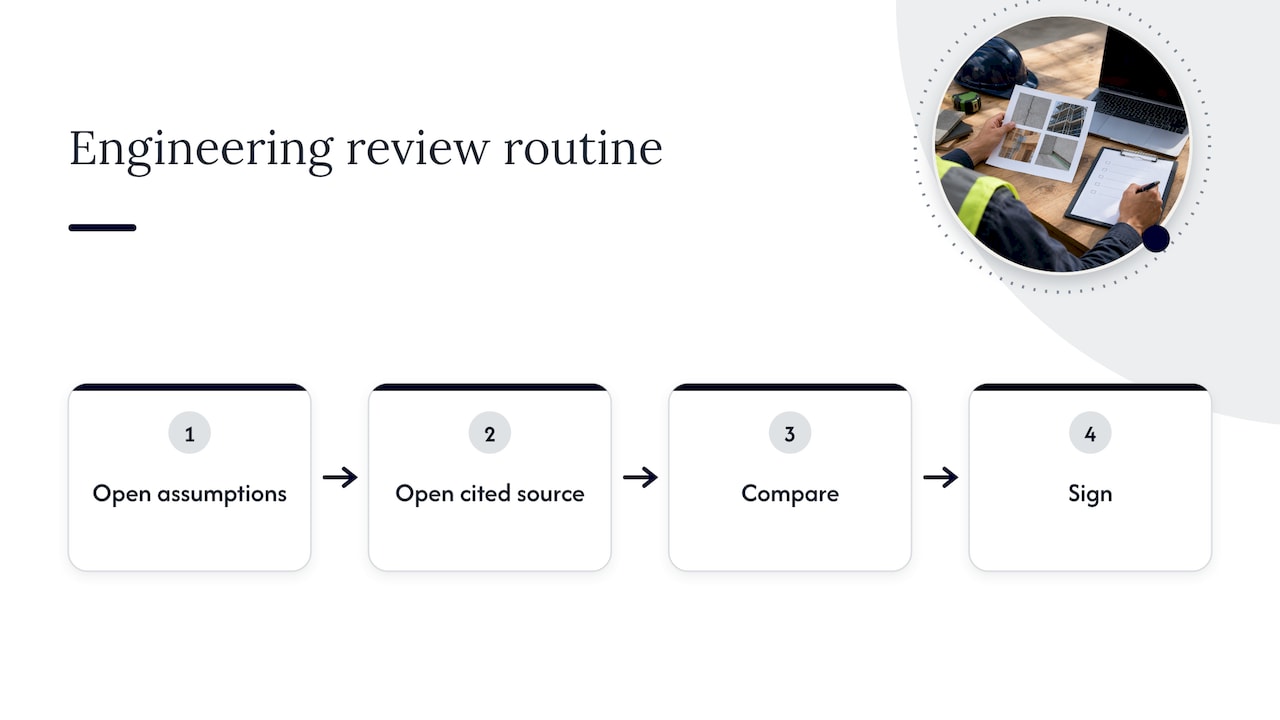
That is why our platform writes down its assumptions and links output to source documents. A training plan can then teach a repeatable routine: open the assumption list, open the cited source, compare, sign. A tool that returns a confident paragraph with no trail forces the reviewer to redo the work, and people quickly stop reviewing.

Perspective: training should teach review, not prompting — overview diagram

We also think organizations underrate the role of project-level questions in training. A site manager does not need a lecture on model architecture; the manager needs to know whether the daily report draft reflects what happened on the site. Engineers do not need a prompt cookbook; they need to know how to spot a quantity that does not reconcile with the model. Teach the work, and the AI literacy follows.

Finally, general models and purpose-built systems diverge as complexity grows. Producing a geotechnical report from raw CPT protocols or one comparable set of numbers from tenders in several currencies are different problems from summarizing an email. Training should show staff both the easy cases where any assistant works and the hard cases where domain-specific tooling and human sign-off decide the outcome.

Putting it into practice with Yesper

If your plan reaches the stage where staff need a working environment for document search, compliance checks, quantity takeoff and deliverable drafting, with sources and assumptions visible to reviewers, Yesper is built for that. It gives each project role its own configured agent, so the training described above happens on real project tasks rather than on a generic sandbox. You can read more about who we are on the company page.

Common mistakes to avoid

  • Training everyone the same way. A single all-hands session is a start, not a plan. Persona-based tracks cost more to design and pay back in adoption.
  • Skipping the data conversation. Staff who do not know what may be uploaded will either upload everything or stop using the tool.
  • Treating AI output as finished work. The sector’s professional bodies are consistent: qualified people remain responsible for the result.
  • Measuring enthusiasm. Survey scores tell you about mood; review rates and error escapes tell you about quality.
  • Having no owner. Without a named enablement owner the plan decays when the first project crunch hits.
  • Starting with the riskiest workflow. Build confidence and evidence on low-consequence tasks first.
  • Ignoring subcontractors. Fragmented supply chains were flagged by UK researchers as a core difficulty. Decide early which rules extend to subcontractors and how you will communicate them.

Risk-oriented teams can also look at how to pilot construction risk AI with workflow and governance, which pairs well with the training sequence above.

Where to find outside resources

Formal courses are one input, not the plan itself. ASCE’s AI RACE roadmap is a solid reading assignment for engineers because it covers civil engineering use cases and the data foundations behind them. The UK AI Skills Framework annex is useful for borrowing role-to-competency mapping even if your firm operates in the US. The RICS report and its responsible-use case study give project managers and surveyors a clear statement of professional responsibility. Combine these with in-house exercises on your own documents and the training will carry over to the work.

How long should an AI training plan for a construction company take?

Plan on a baseline and foundation phase of a few weeks, a first-workflow phase of one or two months, and then continuous quarterly review. The first phases are short because they cover policy and verification habits. Role-specific competence takes longer because it is judged on real work products, not attendance.

Who should own AI training in a construction firm?

Name an executive sponsor who is accountable for the outcome and an enablement owner who runs the program day to day. Add local champions on each project to answer questions and collect corrections. A cross-functional group, including commercial, engineering, IT and field leadership, keeps the policy workable on site.

What should staff never do with AI at work?

They should not upload project or personal data to tools that are not approved, and they should not treat AI output as a final estimate, contract interpretation or safety plan. Those items need qualified human approval. Anything extracted by AI should be verified against the original drawing, specification or contract.

Do field workers need AI training as much as office staff?

They need different training, not less of it. Site supervisors mostly use AI embedded in tools for reports, RFIs and safety notes, so their sessions focus on checking outputs and knowing what site monitoring does and does not do. Office staff need deeper work on takeoff, tender and compliance workflows.

How do we know the training worked?

Compare review rates, first-time validation rates, cycle times and post-approval errors before and after training, per role. Add reviewer feedback on what kinds of corrections recur. If errors escape review or reviewers keep redoing the work, the training needs revision, not the staff.


This post was written with AI assistance and published by Yesper. General information, not professional advice: requirements vary by project and jurisdiction, and the professional responsible for the project decides what applies. Spotted an error? Write to benjamin@yesper.ai.

Benjamin Glaser Co-founder at Yesper. Writes about AI and the industry that builds the world. benjamin@yesper.ai

Yesper is the AI civil engineer for construction and infrastructure. AFRY, COWI, NRC Group and other Nordic firms use it to halve the time on a study, rerun calculations in minutes, and catch errors that would otherwise slip through. Get in touch if you'd like to see what it can do for you.

Book demo