AI can pay back within a budget year in construction, provided it is pointed at the right workflow. Document automation, estimating, progress monitoring, and project controls routinely produce measurable returns, and one published vendor cost model puts payback at 5 to 8 months on an $80 million project. The catch is that most firms haven’t gotten there yet: 45% report no AI implementation at all. The next move for decision-makers is simple: baseline your current cycle times and pick one high-confidence pilot before writing a bigger check.
Benjamin Glaser
16 September 2026 · 18 min read
In short
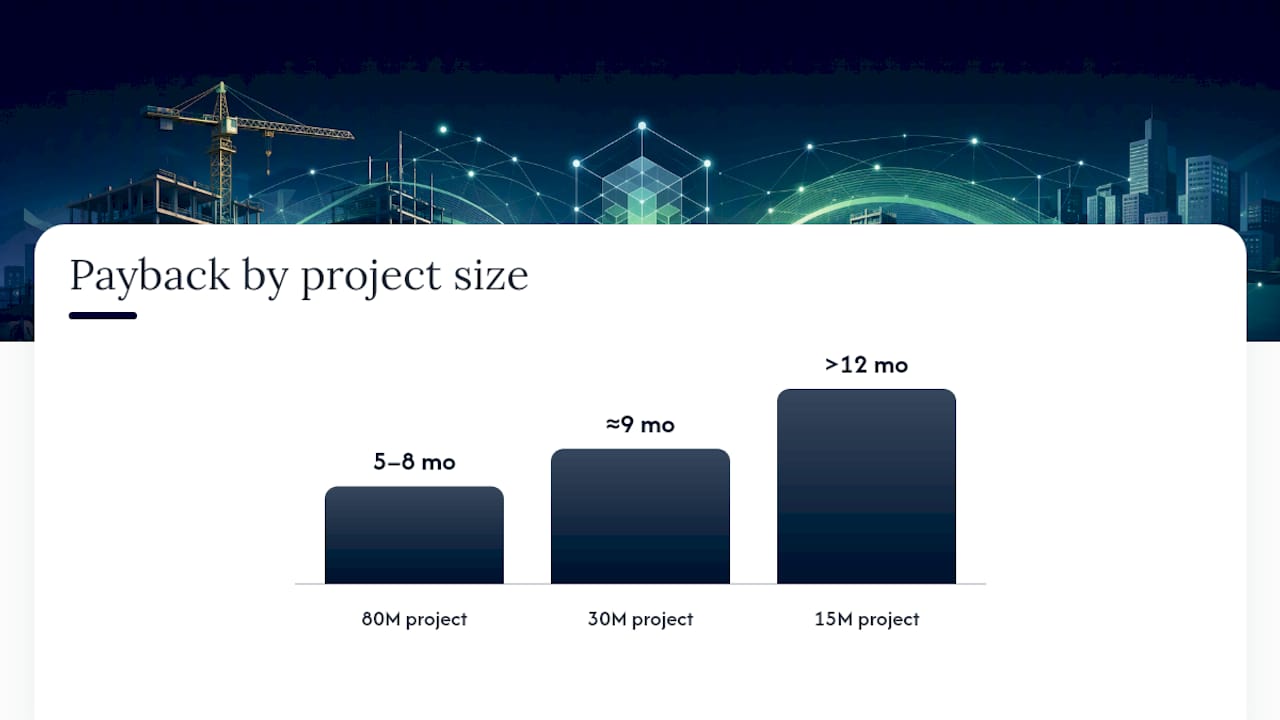
Document and change-order processing offer the fastest and most measurable AI payback; one published vendor cost model puts it at five to eight months on an $80 million project.
Strategic AI use cases like design optioneering and early risk modeling significantly improve project margins but require building internal measurement discipline first.
Implementation costs vary with project size, with large projects absorbing setup expenses quickly, while small projects under $30 million may need pooling across multiple jobs for payback within a year.
The most-cited barriers to AI adoption are skills shortages, integration with existing systems, and data quality, according to the RICS survey.
Firms should start with pilot projects on workflows already reviewed by humans, measure baseline metrics first, and expand only after consistent results to ensure credible ROI.
01
Why AI ROI in construction matters now
The gap between intention and execution has rarely been this wide in construction technology. Industry research shows 56% of surveyed investors plan to increase AI funding, yet very few firms report AI fully embedded across their organization. Nearly half report no implementation whatsoever. That gap is not a failure of technology. It’s a failure of sequencing, measurement, and nerve.
Three forces are converging to make this the year the gap closes. Skilled labor remains scarce across estimating, scheduling, and document control roles, exactly the functions where document-heavy, repetitive cognitive work eats up senior staff time. Project documentation volume keeps climbing, with RFIs, submittals, and change orders multiplying on every job as contracts grow more complex. Margins, meanwhile, stay thin enough that a single missed change order or a scheduling error can wipe out a project’s profit. AI attacks all three problems at once, but only when it’s pointed at the right task.
Here’s what most ROI conversations get backward: they focus entirely on tactical automation, cutting hours out of takeoff or document review, and ignore where the biggest structural value actually sits. The RICS survey makes the same point from the industry’s side: asked where AI will matter most over the next five years, respondents put design optioneering first, at 40%. That’s a strategic use case, not a tactical one. Design optioneering, using AI to rapidly compare structural, mechanical, or site-layout alternatives before ground is broken, changes the economics of a project before a single subcontractor is mobilized.
That distinction between tactical and strategic value matters for how you sequence adoption:
Tactical automation removes labor hours from existing workflows (document review, RFI logging, basic takeoff) and shows up in this quarter’s numbers.
Strategic use cases like design optioneering and early risk modeling change the trajectory of the entire project and show up in next year’s margin.
Most organizations start with tactical wins to build internal credibility, then graduate to strategic applications once governance and trust are established.
The RICS report notes that industry expectations are shifting toward this strategic layer over the next five years, meaning firms that build measurement discipline now will be positioned to capture it first.
The commercial case, then, isn’t “should we adopt AI.” It’s “which use case earns trust fastest, and how do we prove it earned that trust.” That second question is where most ROI conversations should actually start, and it’s the subject of the next section.
02
Which AI use cases deliver the fastest construction ROI?
Not every AI application pays back at the same speed, and treating them as interchangeable is how pilots stall. A systematic literature review of construction project management found that mainstream applications cluster tightly around three areas: cost estimation, scheduling and delay prediction, and safety monitoring using vision and sensor data. That clustering isn’t accidental. Those are the domains with the most structured data and the clearest before-and-after metrics.
Here’s how the highest-impact use cases stack up, ordered roughly by how fast and reliably they pay back.
Document and change-order processing. This is the most repeatable, highest-confidence pilot available to most firms, precisely because the inputs (contracts, RFIs, submittals) are already structured and the outcomes are directly attributable. When AI flags contract discrepancies and accelerates change-order turnaround, one published vendor cost model puts payback at 5 to 8 months on an $80 million project, with net savings in the hundreds of thousands of dollars. Most of that figure comes from recovered change-order value rather than labor hours, and it rests on the vendor’s own assumptions, so treat it as a scenario to test against your baseline rather than a benchmark. Implementation shape: a supervised AI agent that ingests contract documents and flags variance against baseline terms, reviewed by a project engineer before anything goes final.
Document and change-order automation is one of the few AI use cases with a published payback model under 8 months on a large project. That makes it the natural first pilot for most organizations still building internal trust in AI outputs.
AI-driven estimating and quantity takeoff. Pulling quantities out of a BIM model or a stack of drawings manually is slow and error-prone, and it’s one of the tasks where domain-specific AI shows the clearest separation from general-purpose tools. Published ROI figures for estimating are mostly vendor-modelled scenarios rather than measured results, so treat them as directional and measure against your own baseline. Implementation shape: AI extracts quantities from drawings or models, cross-references specifications, and hands estimators a structured takeoff to review rather than build from scratch.
Progress monitoring. Comparing photos, drone footage, or sensor data against the schedule baseline to flag drift early gives project controls teams a head start on corrective action instead of discovering slippage at the monthly report. Implementation shape: automated visual comparison against the four-week look-ahead, with exceptions routed to the superintendent.
Scheduling and project controls. Delay prediction models that flag at-risk activities before they cascade into the critical path let schedulers intervene while options still exist. This is one of the three core application clusters the systematic review found dominates the published research, meaning the evidence base here is deeper than in newer categories like generative design.
Safety analytics. Vision-based monitoring for PPE compliance, fall hazards, and near-misses shows lower headline ROI percentages than estimating or document processing, but the value shows up in insurance premiums and incident-cost avoidance rather than pure labor-hour savings. Treat this as a value-protection use case, not a value-creation one, when building your business case.
Design optioneering. As covered above, this is where the largest structural value sits, but it’s also the hardest to pilot quickly because the feedback loop (did this design decision actually save money) can take months or years to close. Save this for after you’ve built internal measurement discipline on faster-cycle use cases.
Choosing your first use case comes down to three questions: which task has the most structured inputs already, which team is most willing to have its work checked by a machine, and which outcome can you measure within one reporting cycle. Document processing usually wins on all three, which is why it shows up as the recommended starting point in Yesper’s own guidance on rolling out AI in engineering firms.
03
How do you measure AI ROI on a construction project?
ROI measurement fails most often not because the AI underperforms, but because nobody defined what counted as a benefit before the pilot started. Fix that first, and the math takes care of itself.
Start by separating direct benefits from indirect ones. Direct benefits are dollar-denominated and traceable: hours saved on document review, reduction in change-order variance, fewer rework hours, tighter schedule variance, faster working-capital cycles from quicker invoice and change-order approval. Indirect benefits are real but harder to isolate: improved forecasting accuracy, better staff retention because senior engineers spend less time on repetitive review, and stronger client satisfaction from faster turnaround on deliverables. Industry guidance on AI’s financial impact recommends tracking both categories across three phases: 0 to 6 months, 6 to 12 months, and 12 to 24-plus months, since direct labor savings tend to show up first and organizational benefits compound later.
Here is a repeatable model for building your first business case:
Establish the baseline. Measure current hours spent, error rates, and cycle time on the target workflow over at least one full reporting period before any AI tool touches it.
Define the intervention scope. Specify exactly which task the AI handles versus what a human still reviews, since blended tasks make attribution murky.
Set a conservative realization rate. Apply 50 to 70% of the theoretical time savings to your projected benefit, not the vendor’s best-case number, to produce a business case that survives procurement scrutiny.
Calculate the direct benefit. Multiply hours saved by fully loaded labor cost, then add any hard-dollar recoveries from reduced change-order leakage or rework.
Subtract implementation cost. Include licensing, integration hours, and training time, not just the software subscription.
Track for at least two reporting cycles before declaring a verdict, since first-month numbers are usually noisy.
A worked example makes this concrete. Take a mid-size general contractor whose document controllers and project engineers together spend about 15 hours a week on change-order review and contract cross-referencing. At a fully loaded rate of $85 an hour, that’s about $66,000 a year in labor tied to a single workflow. At a 60% realization rate the credited benefit is about $40,000 a year, or roughly $3,300 a month. Labor savings alone therefore cover $20,000 to $30,000 of implementation cost in six to nine months; anything above that has to be justified by hard-dollar recoveries such as reduced change-order leakage.
Attribution discipline is what separates a credible business case from a vendor pitch. Never claim the full theoretical time savings a tool advertises. Always isolate the specific workflow the AI touches from adjacent work a human still does by hand. And always report a range, not a point estimate, since project complexity swings the outcome more than the tool itself does. For a deeper walkthrough of building this model against your own KPIs, Yesper’s guide to evaluating engineering AI ROI covers the KPI-to-dollar conversion in more detail.
04
What does AI actually cost, and when does it pay back?
The honest answer is that implementation cost is largely fixed while the benefit scales with project size, which is exactly why payback timelines vary so much between an $80 million infrastructure job and a $15 million tenant fit-out.
Implementation cost has four line items that vendors rarely bundle into a single number. Integration hours cover connecting the AI tool to your existing document management or BIM environment, and this is usually the largest variable cost since every firm’s tech stack looks different. Licensing is the recurring subscription fee, typically scaled by seat count or project volume. Training time covers getting project engineers and document controllers comfortable reviewing AI output rather than generating it from scratch, which takes longer than most schedules allow for. Supervised tuning is the ongoing cost of correcting the tool’s assumptions on your specific document formats and regional code requirements during the first few months.
On large projects, that fixed integration cost gets amortized fast. A single $50 million to $80 million project can absorb the setup cost and still show payback within the modelled timelines above, because the change-order volume and the labor base being automated are large enough to generate meaningful savings even at conservative realization rates. Below roughly $30 million, the math gets tighter. A $30 million project might have one document controller working part-time on the target workflow, which shrinks the addressable labor cost and stretches payback toward the high end of the range, or beyond it.
Below a certain project value, single-project deployment rarely pays back within a year on document processing alone.
Pooling deployment across three to five smaller projects, with one centralized document-processing workflow serving all of them, is usually what makes the economics work at that scale.
Cross-charging the platform cost across projects, rather than loading it onto a single job’s budget, is the practical fix most firms land on once they hit this wall.
The vendor cost model cited above shows document automation on an $80 million project reaching payback within 5 to 8 months, with net savings in the hundreds of thousands of dollars. Scale matters more than sophistication here. The same tool on a $15 million project won’t hit that window without pooling.
The practical guidance for CFOs and procurement teams evaluating a business case: don’t approve a single-project pilot below $20 to $30 million in contract value unless it’s explicitly structured as a multi-project pooled deployment from day one. Marginal ROI at small scale isn’t a sign the technology doesn’t work. It’s a sign the cost structure needs to be shared.
05
What’s actually blocking AI adoption on construction projects?
The barriers holding back AI adoption in construction are mostly practical ones. In the RICS survey the most-cited obstacles are a lack of skilled personnel (46%), integration with existing systems (37%), and data quality and availability (30%). Resistance to change comes further down the list, at 20%.
Data fragmentation is usually the first wall firms hit. Drawings live in one system, contracts in another, and field photos in a third, with no consistent naming convention tying them together. The fix isn’t a massive data cleanup project before you start. It’s a minimal viable dataset: pick the one workflow you’re piloting, define a simple data contract for what “clean input” looks like for that workflow specifically, and leave the rest of your document sprawl alone for now.
Skill shortages show up differently than most firms expect. It’s rarely a shortage of people who can operate the software. It’s a shortage of people who know how to review AI output critically, the same way a senior engineer reviews a junior engineer’s work rather than either blindly trusting it or re-doing it from scratch. Targeted upskilling on review discipline, not tool operation, is where training budget should go first. Vendor partnerships that include structured onboarding tend to compress this learning curve faster than generic software training does.
Governance concerns, explainability and data security chief among them, are legitimate and shouldn’t be waved away. The mitigation is process, not policy documents: require the AI tool to show its assumptions and source references on every deliverable, the same way you’d expect a junior colleague to cite where a number came from. That single practice does more to build institutional trust than any governance committee.
Pro Tip:Run your first pilot on a workflow where a human already reviews the output today. If document controllers already check every change order before it’s filed, adding AI as a first pass doesn’t change your risk exposure, it just changes who does the first read.
Change management is where most pilots quietly die. A tool that works in a four-week trial but never gets folded into the standard weekly workflow isn’t a failed pilot, it’s an unfinished one. Build the AI step into the actual process documentation, not a side tool people forget to open.
06
How do you scale AI from a pilot to standard practice?
Scaling AI in construction works best as a stage-gated process, where each stage has to earn its way to the next one rather than getting approved on enthusiasm alone.
Select the pilot use case. Choose the workflow with the most structured data and the clearest existing human review step, typically document and change-order processing. Confirm one team is willing to have its output checked by the tool for at least one full reporting cycle.
Baseline and instrument. Measure current hours, error rates, and cycle times before deployment. Without this step, you cannot prove anything later, no matter how good the results feel.
Deploy and measure. Run the tool alongside the existing process for the first cycle rather than replacing it outright. Track the KPIs defined in your ROI model: hours saved, variance reduction, cycle time.
Iterate and scale. Once the pilot clears its realization-rate target for two consecutive reporting periods, expand to a second project or workflow, and formalize the review process into standard operating procedure rather than treating it as a special case.
Minimal telemetry needed at each gate stays lean: hours logged before and after, a variance count on the specific error type the tool addresses, and a simple pass or fail on whether the human reviewer accepted the AI’s output without major correction. You don’t need a data science team to track this. A shared spreadsheet updated weekly is enough for the first two stages.
Governance requires three roles, not a committee. A data owner is responsible for the quality of inputs feeding the tool. A platform owner manages the vendor relationship and technical integration. A domain subject matter expert, usually a senior project engineer, is accountable for reviewing and signing off on outputs during the supervised period. Skipping the domain SME role is the single most common reason pilots that looked promising in testing fail to earn trust once rolled out broadly. For a longer treatment of avoiding stalled rollouts, Yesper’s operational guide to engineering AI adoption walks through the governance checklist stage by stage.
07
What do real construction teams report from using AI?
Proof points from firms already running AI in production tell a more grounded story than vendor projections do. Yesper customers report 50 to 95 percent time saved on project tasks, along with errors caught that manual review had missed.
That range matters because it reflects task variance, not inconsistency. A quantity takeoff pulled directly from a BIM model saves more time than a geotechnical report requiring judgment calls on soil classification. What ties both together is domain specialization: a tool built specifically for construction workflows understands regulatory context and document structure in ways a general-purpose model doesn’t, which is why the performance gap between domain-specific and general AI widens sharply as task complexity increases.
The practical takeaway for readers piloting their own AI adoption:
Look for tools that show their assumptions on every deliverable, the way you’d expect a colleague’s work to be reviewable, not just accepted on faith.
Validate outcomes against a task your team already knows well, so you can judge quality against a baseline you trust.
Track both time saved and error-catch rate during a pilot, since quality improvement is often the larger, if less advertised, benefit.
08
Where should construction leaders focus AI investment in 2026?
Document and change-order processing remains the pilot I’d point every skeptical CFO toward first. It has the shortest measurement cycle, the most structured data, and the clearest attribution path of any use case covered here. Estimating and progress monitoring come next, once your organization has built the muscle of reviewing AI output critically rather than either rubber-stamping it or dismissing it outright.
On buy versus build: build is almost never the right call for a mid-size contractor. The cost of maintaining a model that understands regional building codes, contract structures, and BIM standards is a full-time engineering problem, not a side project for your IT team. Buy from a vendor with construction-specific domain knowledge, and size your first pilot to one workflow, one project, one reporting cycle. Resist the urge to pilot three use cases simultaneously just because budget got approved.
My closing recommendation is unglamorous but it’s the whole game: the firms that win with AI in construction aren’t the ones with the flashiest tool. They’re the ones disciplined enough to measure a baseline before they start and honest enough to report a conservative number when the pilot ends.
09
Where Yesper fits into your AI ROI plan
Yesper is built specifically for the document processing, quantity takeoff, and deliverable creation work covered throughout this guide. It reads project documents, drawings, and BIM models the way a specialized colleague would, then writes down its assumptions on every output so a project engineer can review it the same way they’d review a junior team member’s work rather than taking it on faith. That traceability is what lets a business case survive procurement scrutiny instead of stalling on a governance objection.
If you’re building the business case outlined above, the fastest way to get real numbers instead of vendor estimates is to measure one workflow against your own baseline. Yesper works with construction and infrastructure teams including AFRY, NRC Group, and Netel on exactly this kind of work, from document automation to takeoff to end-to-end deliverable drafting. Visit Yesper’s platform page to see how the integration and review workflow fits your existing systems, or head to Yesper to request a demo and start baselining your own numbers before your next budget cycle.
Yes, where it is pointed at a measurable workflow. One published vendor cost model puts payback for document and change-order automation at 5 to 8 months on an $80 million project, with most of the saving coming from recovered change-order value. Treat figures like that as scenarios: the ROI you can defend is the one measured against your own baseline.
What is the 10/20/70 rule for AI adoption?
The 10-20-70 rule, popularized by BCG, says that roughly 10% of the effort in an AI program goes into algorithms, 20% into technology and data, and 70% into people and processes. For construction the implication matches the rest of this guide: budget most of the effort for workflow change, review discipline, and training rather than for the model itself.
Will AI replace the construction industry?
No. AI in construction currently automates specific tasks within workflows, document review, takeoff, progress comparison, not entire jobs or trades. The clustering of proven applications around cost estimation, scheduling, and safety monitoring shows AI acting as a review and acceleration layer, with human judgment still governing final decisions on complex engineering deliverables.
What counts as ROI in a construction AI project?
ROI combines direct, dollar-denominated benefits (hours saved, reduced change-order variance, faster approval cycles) with indirect benefits like improved forecasting and staff retention. The most credible business cases apply a conservative realization rate of 50 to 70% of theoretical time savings rather than a vendor’s best-case projection.
How long does it take to see AI ROI on a construction project?
On large projects ($50 million to $80 million), the vendor cost model cited above puts payback at 5 to 9 months for document-heavy workflows. Smaller projects under $20 to $30 million often need pooled deployment across multiple jobs to reach a comparable payback window, since a single small project rarely generates enough labor-hour savings to cover integration costs alone.
This post was written with AI assistance and published by Yesper. General information, not professional advice: requirements vary by project and jurisdiction, and the professional responsible for the project decides what applies. Spotted an error? Write to benjamin@yesper.ai.
Benjamin GlaserCo-founder at Yesper. Writes about AI and the industry that builds the world.benjamin@yesper.ai
Get news and articles in your inbox.
Unsubscribe anytime.
Yesper is the AI civil engineer for construction and infrastructure. AFRY, COWI, NRC Group and other Nordic firms use it to halve the time on a study, rerun calculations in minutes, and catch errors that would otherwise slip through. Get in touch if you'd like to see what it can do for you.