90 day project knowledge management for construction teams

Project knowledge management is the practice of capturing what a project team learns, decides, and discovers, then routing that information back into daily decisions instead of burying it in a closeout report. Done well, it shortens ramp-up for new team members and cuts the rework that comes from repeating mistakes nobody wrote down. The rest of this guide covers how to build a version of it that is light enough for your team to actually use.

Construction project documents in Nordic site office
  • Focusing capture efforts on decisions, risk mitigations, and reusable templates ensures the most valuable knowledge is retained and easily accessible during projects.
  • Embedding simple, targeted practices like adding a decision rationale field to existing forms and conducting short debriefs improves knowledge sharing without disrupting workflows.
  • Assigning a single owner to oversee knowledge quality and capturing at decision points prevents the repository from becoming noisy or neglected.
  • Measuring metrics such as onboarding time, rework hours saved, and search frequency helps validate the impact of knowledge management efforts over time.
  • Successful project knowledge management relies on early governance, organizational culture that encourages transparency, and integration into existing project phases rather than relying on additional tools or mandates.

What project knowledge management actually means

The APM defines project knowledge management as a cross-functional discipline, not a filing exercise. The goal is to create conditions where tacit and explicit knowledge move between people, not to archive lessons after the project ends. That framing matters because most organizations still treat KM as a PMBOK-adjacent compliance step, something you do once, at closeout, for the next team’s benefit.

Project knowledge splits into a few useful categories. Structured knowledge lives in documents, drawings, and databases. Semi-structured knowledge lives in meeting notes, chat threads, and marked-up drawings. Tacit knowledge lives in a senior engineer’s head and rarely survives a resignation letter.

  • Explicit knowledge: specifications, calculations, test results, contracts.
  • Tacit knowledge: judgment calls, workarounds, “why we didn’t do it that way.”
  • Decision-usable knowledge: whatever a person needs at the exact moment they are making a call, regardless of format.

Projects are temporary by design, which changes capture priorities. A department can wait a quarter to document a process. A project team disbands the day the ribbon gets cut, so capture has to happen while the work is happening.

What to capture: Artifacts worth the effort

Not every meeting note deserves a permanent home. Prioritize artifacts that someone will need again, in a different context, months from now.

  1. Decisions and their rationale. Not just what was decided, but why alternatives were rejected. This is the single highest-value artifact in project knowledge management, because the “why” is what disappears first.
  2. Risk mitigations that worked. Generic risk registers age badly. The mitigation that actually held is worth keeping.
  3. Test and inspection outputs. Especially where a result contradicted an assumption.
  4. Reusable templates. A calculation sheet, a submittal format, a checklist someone already debugged.
  5. Assumptions log. What the team believed to be true at each phase, since assumptions are the first thing that breaks under scrutiny later.
  6. Authority and regulatory contacts. Who at the permitting office actually answers emails.

Tacit knowledge needs a conversion step before it counts as decision-usable knowledge in this system: a short recorded debrief, a five-minute voice note, or a mentor pairing session, tagged by project phase and discipline so it surfaces later through search rather than memory.

Why knowledge management fails on projects

Most project knowledge management efforts fail for mundane, predictable reasons. Capture happens too late, usually crammed into a lessons-learned session in the final week when half the team has moved on. Ownership is diffuse: everyone’s job, so nobody’s job. Storage is siloed across email, shared drives, and whatever tool the last PM preferred. Artifacts, when they exist, are unreadable to anyone who wasn’t in the room.

The APM’s research surveying over 200 project professionals found that lessons-learned processes fail primarily because organizational KM strategy is disconnected from daily project practice. It’s a strategy document, not a habit.

Two diagnostic signals suggest your project has a gap: repeated mistakes across similar projects, and onboarding that takes weeks because nothing is written down anywhere searchable.

  • Rework traced back to a decision nobody can explain
  • New hires asking questions that were already answered six months ago
  • A lessons-learned document that nobody reads before the next project starts

Pro Tip: If your only knowledge capture mechanism is a closeout meeting, you don’t have a knowledge management practice. You have a postmortem. The fix is moving capture earlier, to the moments decisions actually get made.

Lightweight practices that fit into real project work

The practices that survive are the ones that ride inside existing workflows instead of demanding a separate step.

  1. Capture where work already happens. Add a mandatory “decision rationale” field to your change order form or meeting minutes template. Don’t build a new tool; use the one people open anyway.
  2. Keep debriefs short. A five-minute end-of-milestone debrief, three questions max: what surprised us, what would we do differently, what should the next phase know.
  3. Make artifacts reusable, not just archived. A calculation template with a one-paragraph “how to use this” note beats a folder of past projects nobody opens.
  4. Build habit loops. Assign a rotating capture role each sprint or phase, set a fixed cadence, and make good captures visible, such as a monthly highlight in the team stand-up.

Pro Tip: Attach knowledge capture to a moment that already recurs, like a phase gate review or a weekly stand-up, rather than inventing a new meeting. New meetings die within a quarter; habits attached to existing ones survive.

The TU Delft research on inter-project learning makes a point worth remembering: documentation alone doesn’t produce reuse. Knowledge has to be translated for the next context and surfaced at the moment someone is actually deciding something, not just filed for posterity.

A step-by-step setup for a simple project KM system

You do not need a knowledge management platform to start. You need five decisions, made deliberately, in this order.

  1. Pick three knowledge types to capture, and only three. Decisions and rationale, risk mitigations, and reusable templates cover most of the value for most teams. Resist the urge to capture everything.
  2. Choose a shared location inside tools you already use. A tagged folder in your existing document system or a dedicated channel in your project management software beats a new wiki nobody will check. A new silo is worse than no system at all.
  3. Assign an owner and a tiny quality rule. One person, even part-time, who screens entries for one thing: is this understandable to someone who wasn’t there. That single filter eliminates most useless captures.
  4. Schedule capture at decision points, not just at the end. Phase gates, design reviews, and change orders are natural moments. Closeout is the worst moment, because memory has already decayed.
  5. Measure one metric and adjust. Time-to-onboard a new team member or hours spent on rework traced to a missed decision. Track it for 90 days, then decide what to change.

Skipping step three is the most common mistake. Without an owner and a quality filter, the repository fills with noise, and noise is why most teams abandon knowledge management projects within a year.

Tools, search, and where AI actually helps

A simple indexed repository, tagged consistently and searched by keyword, handles most small project teams’ needs. AI is valuable when volume grows beyond what keyword search can handle, such as retrieval across many documents, summarization of lengthy decision threads, and traceability linking claims back to source documents.

The ScienceDirect review on AI and knowledge management argues AI works best as a partnership, not a replacement. AI augments search, summarization, and knowledge graphs, but tacit-to-tacit transfer between people still requires human judgment, and explainability has to be built in rather than assumed.

Three guardrails matter in practice:

  • Provenance first. Every AI-generated summary should trace back to its source document, not just assert a conclusion.
  • Human-in-the-loop review. Treat AI output the way you’d treat a junior engineer’s draft: reviewable, not final.
  • Integration over replacement. A tool that plugs into your existing engineering knowledge base tools beats one that asks your team to adopt a second system.

Roughly a fifth of KM failures trace back to tools that isolate knowledge in a new silo instead of integrating with what teams already use, a pattern the APQC’s project knowledge research keeps surfacing across industries.

The prepare, capture, moderate, share, transform framework

For organizations running multiple projects at once, an ad hoc approach stops scaling. PMI’s guidance and SAP’s PM KM framework both converge on a five-stage lifecycle: prepare, capture, moderate, share, transform.

Prepare means setting up storage locations and a minimum-information policy before a project starts, not after it’s finished. Capture happens at decision points, not just at closeout. Moderate is the quality checkpoint, one person or a small rotating group screening entries for clarity and relevance. Share pushes knowledge to the people who need it, rather than waiting for them to search. Transform is where captured knowledge gets folded into updated templates, standards, and training.

  • Track decision-use cases: how often a captured decision actually got reused
  • Track onboarding time for new hires or transferred staff
  • Track rework hours avoided, even as a rough estimate

None of this requires a large team. A rotating moderator and a shared tagging convention, applied consistently, reduces rework more than an elaborate KM department most mid-sized firms can’t staff anyway.

How Yesper supports knowledge management on construction projects

Construction and infrastructure firms face a version of this problem sharpened by scale: decades of engineering judgment locked in retired staff’s heads, and thousands of documents per project that nobody has time to re-read. Yesper, an AI civil engineer built specifically for this sector, works inside project teams to make that institutional knowledge searchable and its outputs traceable back to source documents.

At COWI, thirty years of project history became reference material engineers actually use rather than an archive nobody opened. At Entek, documentation itself became a contract-ready artifact instead of a parallel administrative task.

  • Searchable institutional knowledge across past projects and disciplines
  • Six-stage document control built to catch errors before they become rework
  • Outputs that show their assumptions, so a reviewer can check the work the way they’d check a colleague’s

None of this replaces engineering judgment or project governance. It gives the humans making those calls faster access to what the organization already knows.

Integrating KM with every project phase

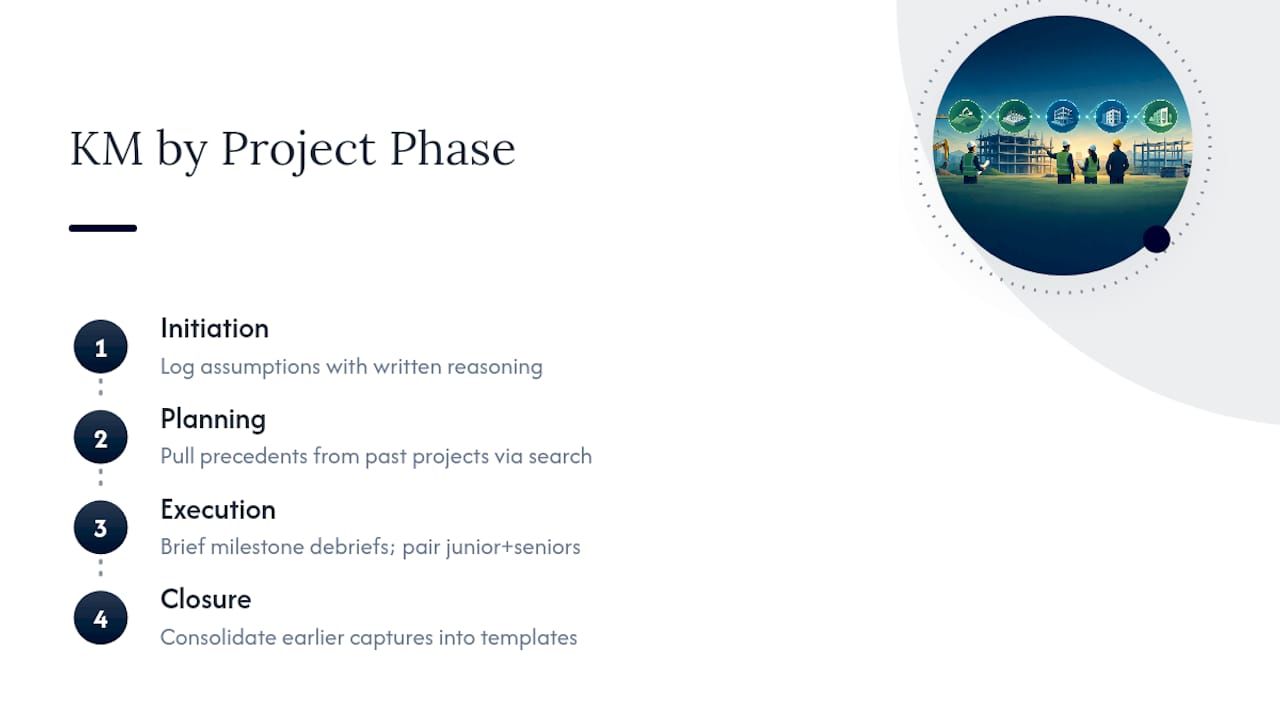
Knowledge management that only shows up at closeout arrives too late to help the project it came from. Each phase needs its own capture moment, tied to decisions actually being made in that phase.

Initiation is where assumptions get set, often under time pressure and incomplete information. Capture them explicitly, in writing, with the reasoning behind each one. This single artifact, an assumptions log started at kickoff, prevents more disputes later than any other document, because it lets the team point back to what was known when a decision was made rather than arguing from hindsight.

Planning is where risk registers and mitigation strategies take shape. This is the natural moment to pull relevant knowledge from past projects, not to generate it from scratch. If a past project solved a similar geotechnical or permitting problem, planning is when that precedent should surface, ideally through a search interface rather than someone’s memory of “who worked on that one.”

Execution generates the highest volume of decision-usable knowledge and the highest risk of losing it. Change orders, field adjustments, test results that contradict a design assumption. Debriefs at each milestone, kept to a few minutes, catch this before it evaporates. This is also where tacit knowledge transfer matters most: pairing junior staff with senior engineers during execution captures judgment that never makes it into a written report.

Closure is where most organizations concentrate their KM effort, and it’s the least effective point to do it. By closeout, the team has scattered, memory has decayed, and the incentive to document honestly has weakened. Closure still matters, but for a narrower job: consolidating what was captured earlier into templates and standards for the next project, not generating fresh insight from a team already mentally elsewhere.

Integrating KM With Every Project Phase — overview diagram

Case examples of knowledge management that worked

The Hong Kong-Zhuhai-Macao Bridge and the Gaasperdammer Tunnel projects, studied together in research on continuous learning in infrastructure megaprojects, identified five principles that separated projects where learning stuck from projects where it didn’t: owner commitment, a deliberate social environment for sharing, a shared collaboration vision, value orientation, and an open mindset toward admitting what didn’t work. None of these are tools. They are governance choices made by project sponsors before a single document gets filed.

The Silvertown Tunnel project offers a smaller, more tactical example. According to an APM blog account of the project, co-locating team leads and adopting agile sprint structures did more for knowledge flow than any formal repository. Proximity and recurring stakeholder engagement beat a well-organized shared drive, because knowledge moved through conversation before anyone had to write it down.

The common thread across both cases: successful project knowledge management wasn’t a system bolted onto the project. It was a set of governance and cultural decisions, made early, that gave knowledge somewhere to go. The tunnel projects had sponsor commitment; Silvertown had physical and organizational proximity. Neither relied on a mandate to “document lessons learned” as its primary mechanism, because that mandate, on its own, rarely survives contact with a busy project schedule.

Security and privacy in project knowledge systems

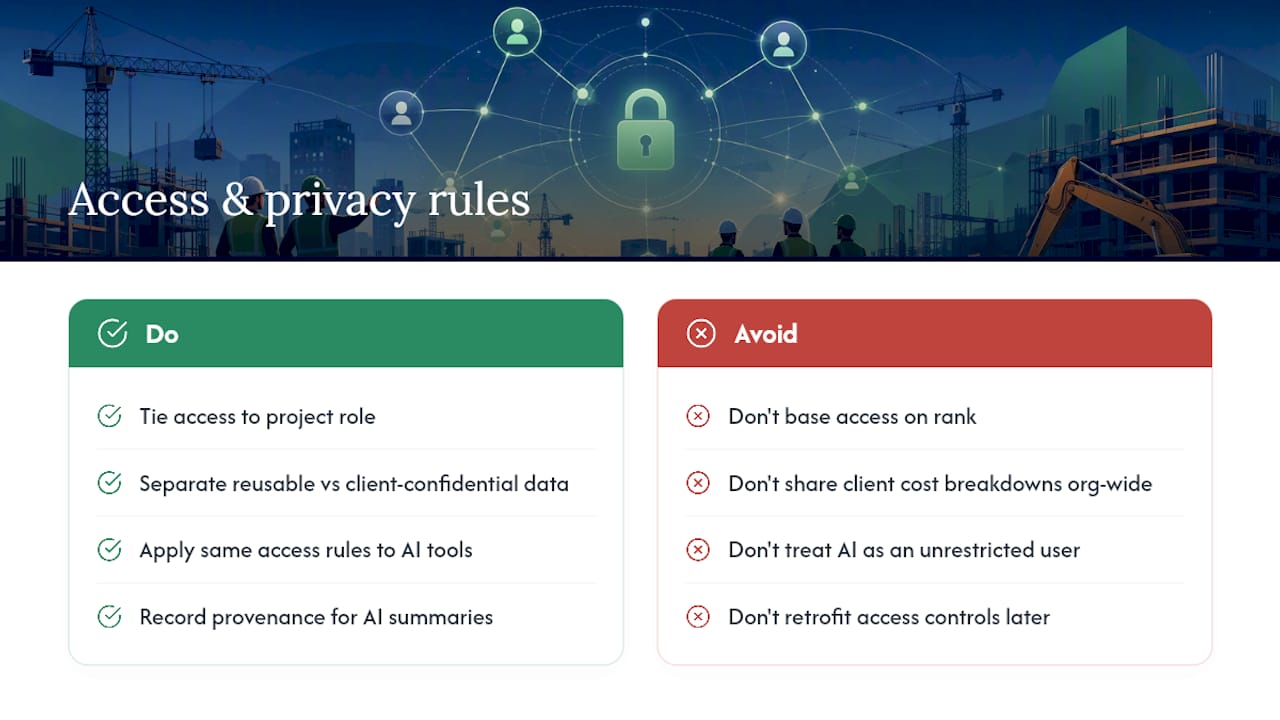
Project knowledge often includes information a contractor would rather not see spread beyond the project team: pricing assumptions, subcontractor performance notes, client-specific design constraints, and sometimes regulatory correspondence that carries its own confidentiality obligations. A knowledge management system that makes this searchable also makes it exposed if access controls are an afterthought.

Three practical rules reduce the risk without slowing capture down. First, tie access to project role, not to organizational rank. A subcontractor’s team should see what’s relevant to their scope, not the full commercial file. Second, separate what’s shareable across the organization from what stays inside a single client engagement. A reusable calculation template can travel; a client’s confidential cost breakdown cannot. Third, treat AI-assisted search the same way you’d treat a new hire: capable, useful, and still subject to the same access boundaries as any other user of the system.

Provenance matters here too. If an AI tool summarizes a document or answers a question by pulling from project files, the summary should be traceable back to its source, so a reviewer can confirm what was actually said versus what was inferred. This isn’t a compliance nicety. On regulated infrastructure work, an unverifiable claim in a knowledge base can end up embedded in a design decision, and unwinding that later costs far more than the review would have.

None of this argues against building a searchable knowledge base. It argues for building access controls into the system from day one, rather than retrofitting them after the first uncomfortable question from a client’s legal team.

Security and Privacy in Project Knowledge Systems — overview diagram

Culture: The variable that determines whether any of this works

None of the practices above survive an organizational culture that punishes admitting mistakes. If a team’s incentive is to look competent rather than to be useful to the next project, lessons-learned sessions turn into a recitation of successes and a careful avoidance of anything that went wrong. That’s the single biggest reason lessons-learned documents, across industries, tend to gather dust: they were never honest in the first place.

The infrastructure megaproject research cited earlier names “open mindset” as one of five conditions for continuous learning, and it’s arguably the hardest one to manufacture. An open mindset requires psychological safety: people need to believe that flagging a bad decision won’t cost them at review time. Owner and sponsor commitment matters here too, because culture on a project usually follows whatever the most senior person visibly rewards.

Temporary team structure compounds the problem. A project team that disbands in six months has little incentive to invest in knowledge that benefits someone else’s next project. This is where organizational, not project-level, culture has to carry the weight: KM works when the parent organization rewards contribution to institutional knowledge as part of performance review, not as an unpaid extra. Without that structural incentive, even a well-designed capture system will sit half-used, because nobody’s job depends on filling it in.

Measuring whether your KM effort is actually working

Most project knowledge management efforts never get measured, which is part of why they get cut during the next budget review. A handful of metrics, tracked consistently, make the value visible.

Time-to-onboard is the simplest and most persuasive. Measure how long it takes a new team member to become productive on a project, before and after a knowledge base exists. A drop from three weeks to one week is a number a project sponsor understands immediately.

Decision-use cases track whether captured knowledge actually gets reused, not just archived. Each time someone pulls a past decision, template, or risk mitigation into a current project, that’s a use case worth logging, even informally. A repository with zero reuse after six months is a signal to change the capture method, not the technology.

Rework hours avoided requires a rough estimate rather than perfect precision. When a team catches an error early because a similar issue was documented from a past project, log the estimated hours saved. Over a year, these estimates accumulate into a credible case for continued investment.

Search and retrieval frequency indicates whether the system has become part of daily work or sits unused. A knowledge base that nobody searches isn’t failing because the content is bad; it’s failing because it isn’t embedded in the workflow.

None of these metrics require a dashboard investment. A shared spreadsheet, updated monthly by the KM owner assigned back in the setup phase, is enough to start. What matters is tracking one metric consistently rather than several sporadically, because consistent tracking is what turns a KM effort from a one-time initiative into an ongoing practice.

Three priorities for the next 90 days

Most project knowledge management advice fails because it asks for too much, too fast. Pick three knowledge types worth capturing, and instrument that capture inside tools your team already opens daily. Assign one owner, even part-time, and fix a recurring moment, a phase gate, a weekly stand-up, where capture happens.

Then measure exactly one thing: onboarding time or rework hours. Ninety days is enough to know if the habit is sticking. If it isn’t, the fix is almost never more technology. It’s a missing owner, or a capture moment that doesn’t align with when decisions actually happen.

Where Yesper fits in construction knowledge management

Firms building a construction knowledge base often reach the same wall: institutional knowledge exists, but it’s scattered across retired staff, closed projects, and documents nobody has time to re-read before a deadline. Yesper was built specifically for that problem in construction and infrastructure work, combining project document search with traceable, source-verified outputs so a reviewer can check an AI-generated answer the way they’d check a colleague’s draft.

That fit shows up in practice at companies like COWI and Entek, where searchable institutional knowledge and contract-ready documentation replaced scattered files and tribal memory. If your team is evaluating how a purpose-built AI platform could support your own knowledge management setup, start by reviewing Yesper’s platform page to see how the platform is built for construction-specific workflows and regulatory complexity.

What are the five c’s of knowledge management?

Definitions vary across frameworks, but a common version covers creating, capturing, curating, communicating, and consuming knowledge. In project settings, the practical version that matters most is the prepare, capture, moderate, share, transform lifecycle that PMI and SAP’s PM KM framework both use.

What are the five steps of PMBOK’s lessons-learned process?

PMI outlines identifying, documenting, analyzing, storing, and retrieving lessons learned as the core five-step process. The value only materializes at the final step, retrieval, which is why capture timing and searchability matter more than the documentation itself.

What percentage of a project manager’s job is communication?

A commonly cited figure suggests project managers spend roughly 90 percent of their time communicating, coordinating, and sharing information rather than doing technical work directly. That number underscores why embedding knowledge capture into existing communication channels, rather than adding a separate system, gets far higher adoption.

What skills do project managers need to run effective knowledge management?

Strong project knowledge management leans on communication, stakeholder engagement, risk assessment, and governance skills more than technical documentation ability. A project manager also needs enough process discipline to assign ownership and enforce a lightweight quality check, since a knowledge base without a moderator quickly fills with unusable noise.

Can AI replace manual knowledge capture on projects?

No. AI tools, including platforms like Yesper, strengthen search, summarization, and retrieval across large document sets, but tacit knowledge transfer between people still depends on human judgment and deliberate capture habits. The research on AI and KM partnership treats AI as an augmentation layer, not a substitute for the human processes that decide what gets captured in the first place.


This post was written with AI assistance and published by Yesper. General information, not professional advice: requirements vary by project and jurisdiction, and the professional responsible for the project decides what applies. Spotted an error? Write to benjamin@yesper.ai.

Benjamin Glaser Co-founder at Yesper. Writes about AI and the industry that builds the world. benjamin@yesper.ai

Yesper is the AI civil engineer for construction and infrastructure. AFRY, COWI, NRC Group and other Nordic firms use it to halve the time on a study, rerun calculations in minutes, and catch errors that would otherwise slip through. Get in touch if you'd like to see what it can do for you.

Book demo