Cut rework: Project teams' six stage construction document control

Construction document control is the discipline of managing who creates, reviews, approves, and distributes project documents, with a verifiable trail for every version. The single most important move a project team can make is sequencing it correctly: define your document workflows first, then configure a Common Data Environment governed by ISO 19650 metadata and version rules around those workflows, not the other way around. Get that order right and you cut rework, produce an audit trail that survives a dispute, and speed up approvals across the board.

Construction documents organized in site office
  • Proper sequencing of document workflows before configuring a Common Data Environment reduces rework, speeds approvals, and ensures compliance with ISO 19650 standards.
  • Enforcing strict naming conventions, a fixed versioning notation, role-based distribution, and early closeout planning prevents common failures and miscommunications.
  • Configuring a CDE around workflows and metadata, with clearly defined roles and milestones, is critical to avoid system failures and ensure reliable information exchange.
  • Software choices should prioritize native metadata support, audit trails, drawing comparison, offline access, and BIM integration, tested on real project data during pilots.

Why construction document control determines project risk

Documents are where construction risk actually lives. A superseded drawing issued to a subcontractor, an approval that never got logged, a spec revision that sat in someone’s inbox for two weeks. These are not paperwork failures. They are the mechanism through which schedule slippage and cost overruns actually happen on site.

Why Construction Document Control Determines Project Risk — overview diagram

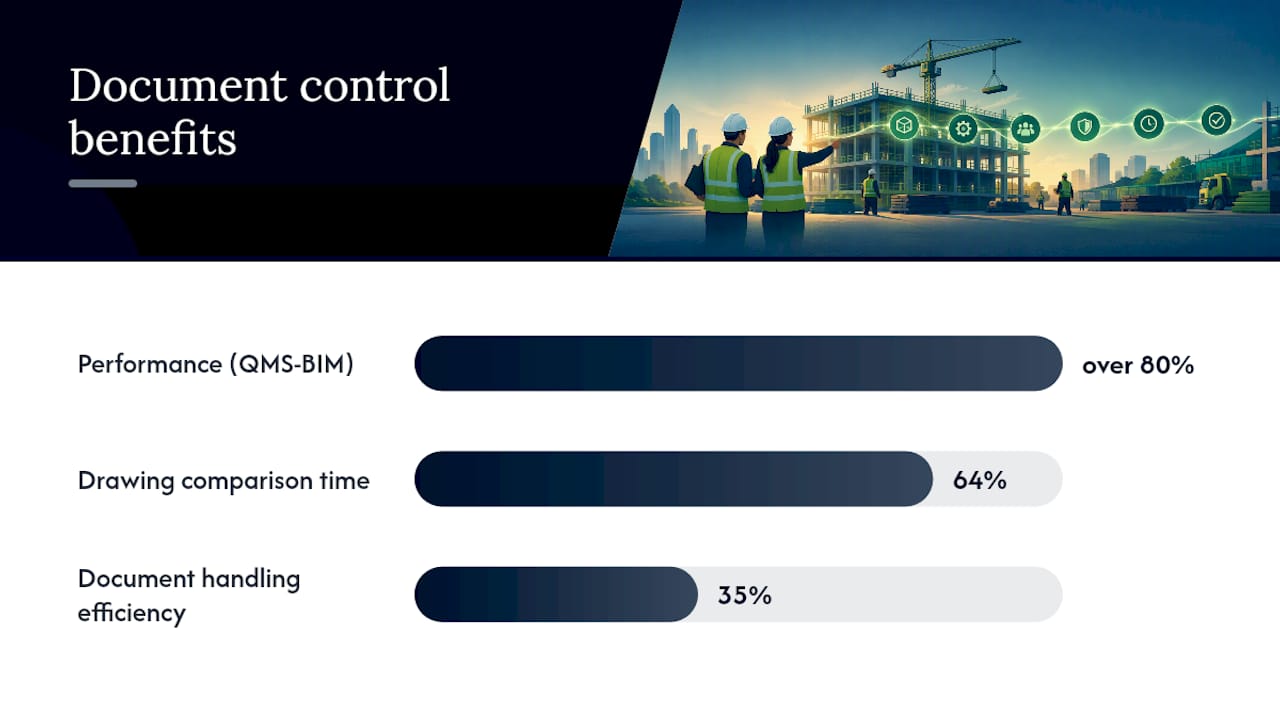
The evidence for treating this as a controls discipline rather than clerical work is direct. A JCEM study published by ASCE found that integrating quality documentation into Building Information Modeling, an approach researchers label QMS-BIM, delivered over 80% better performance than conventional systems in a tested field scenario, largely by catching inspection issues before they became reactive rework. Separately, a pilot of an AI-enhanced centralized digital workflow documented in the IJRISS journal cut drawing-comparison time by 64% and lifted document handling efficiency by 35% against manual, email-and-shared-drive processes.

The operational payoff shows up in a few concrete places:

  • Auditability: every approval and revision has a timestamp and an owner, which matters enormously if a claim ever goes to arbitration.
  • Faster decisions: field teams stop guessing which drawing revision is current.
  • Fewer disputes: a defensible trail of who approved what, and when, undercuts most contractual finger-pointing before it starts.

The six-stage document control workflow

Every construction project document moves through the same basic sequence, whether the team realizes it or not. Making that sequence explicit, and assigning ownership at each stage, is what separates functioning document control from chaos with a folder structure on top of it.

  1. Intake. A document enters the system, whether created internally or received from a consultant. It gets a unique ID under the project’s naming convention immediately, before anyone touches the content.
  2. Produce. The originating party drafts the document and marks it Work in Progress (WIP), meaning it is not yet fit for sharing outside its authoring team.
  3. Review. A technical reviewer, often a discipline lead, checks the content against the brief and applicable standards. This is where most substantive errors get caught, if the review step is enforced rather than skipped under deadline pressure.
  4. Approve. A named authority signs off, moving the document from WIP to a shared or published state. ISO 19650 uses status codes here, for example S codes for shared, suitability-checked information and A code for published, authorized information, so the state travels with the file rather than living in someone’s memory.
  5. Distribute. The document reaches everyone who needs it, with the system logging who received which revision and when.
  6. Archive. Superseded versions get retired from active circulation but preserved for the record, never deleted.

Milestone gates deserve special attention. At each major project milestone, someone with real authority, not just the document controller, needs to formally accept the current document set before the project moves forward. Skipping that checkpoint is how outdated drawings quietly survive into construction.

Pro Tip: Log the information state, WIP or published, as metadata on the file itself, not in a separate spreadsheet. A spreadsheet gets out of sync within a week; metadata that travels with the container does not.

Best practices for naming, versioning, and closeout

Most document control failures trace back to a handful of preventable habits, not a lack of software. Fix these and the rest tends to fall into place.

  • Adopt one project-wide naming convention before issuing anything. ISO 19650 requires that every information container carry a unique ID drawn from an agreed, documented convention, and that convention has to exist before tender information goes out, per BIM ISO 19650 guidance.
  • Pick one versioning notation and enforce it. Decimal notation (P01.1, P01.2) for minor WIP revisions and a fresh whole number or R notation (R01, R02) for issued revisions is a common, workable split. Mixing conventions across disciplines is a near-guaranteed source of confusion.
  • Restrict distribution by role, not by goodwill. A subcontractor should see the drawings relevant to their scope, not the entire project archive. This also protects sensitive commercial or safety-critical content from over-exposure.
  • Plan field access separately from office access. Site teams working off tablets in a trench need offline-capable, mobile-friendly access to the current published set, which is a different technical requirement than desktop review workflows.
  • Start closeout planning at kickoff, not at completion. Waiting until handover to think about what the owner actually needs, as-builts, O&M manuals, warranty documentation, guarantees a scramble.
Practice area Core rule Common failure it prevents
Naming convention One project-wide, ISO 19650 aligned ID scheme Duplicate or ambiguous file names across disciplines
Versioning Fixed notation for WIP vs. issued revisions Field teams building from a superseded drawing
Distribution Role-based access, logged transmittals Unauthorized parties seeing commercially sensitive content
Closeout Handover checklist defined at kickoff Incomplete as-built package at project end

The Fieldwire guide to construction document control walks through similar territory from a field-operations angle, and it is worth reading if your gaps are more about site adoption than system design.

Configuring a CDE to match ISO 19650

A Common Data Environment is not a piece of software. It is workflows plus a technical platform, and the workflows come first. That framing comes straight from the UK BIM Framework’s guidance on CDE workflows, which stresses that selecting a technical solution before agreeing on the underlying process is one of the most common causes of CDE failure.

Under ISO 19650, the appointing party is accountable for the project CDE existing and functioning before information exchange begins in earnest. Waiting until design starts to sort out the CDE is already too late.

When you configure or accept a CDE, insist on these metadata fields for every container:

  • Classification, tying the document to a discipline, system, or work package.
  • Information state, WIP, shared, or published, so nobody mistakes a draft for an approved issue.
  • Revision, following the project’s agreed notation.
  • Permitted use, communicated through status codes so recipients know whether a document is for information only, for coordination, or for construction.

One practical headache: when different delivery teams run different CDE platforms, metadata does not always transfer cleanly between systems. Agree in advance how metadata will be preserved or manually reconciled during any handoff, and never let folder structures substitute for the metadata itself. A folder name is not a status code.

Who owns what: Roles and governance

Document control breaks down most often at the boundary between roles, when everyone assumes someone else logged the approval. ISO 19650 draws clear lines that projects ignore at their own risk.

  • The appointing party (usually the client) sets information requirements and is ultimately accountable for the CDE existing.
  • The lead appointed party coordinates the delivery team’s information production and enforces the agreed naming and metadata rules downstream.
  • The document controller runs daily operations: intake, applying naming conventions, maintaining version logs, executing distribution, and managing the archive.

Governance sits on top of these roles as a set of checkpoints, not paperwork for its own sake. Someone with real authority signs off at each milestone. Non-compliant documents get flagged and corrected before they propagate. And a short lessons-learned review after each phase catches process gaps before they repeat on the next project.

Choosing document control software without getting sold a platform

Buy the workflow, not the demo. Map your Exchange Information Requirements and BIM Execution Plan first, then evaluate software against that map, because a beautifully designed platform that does not match how your teams actually approve documents will get bypassed within a month.

Features that separate genuine document control platforms from glorified file storage:

  • Native metadata support, so classification, revision, and status travel with the file rather than living in a filename.
  • Real revision control, with a locked audit trail showing who changed what and when.
  • Drawing comparison, ideally automated, since manually spotting differences between revision sets is exactly the kind of task that eats hours and still misses things.
  • Mobile and offline access for field teams working without reliable connectivity.
  • BIM integration, so document status connects to the model rather than existing as a parallel universe.

Ask any vendor how metadata survives an export to another system, and ask for a live demonstration of drawing comparison on a real revision set, not a scripted one.

Pro Tip: Run a two-week pilot using your own messiest live project, not a clean sample dataset. Software that looks great on tidy demo data often falls apart on the naming inconsistencies your actual projects have accumulated.

Training and certification paths for document controllers

Building competency does not require hiring a specialist for every project, but it does require deliberate practice. Short, ISO 19650 aligned courses, such as the BRE Academy’s course on delivering information management in practice, give project staff a working grasp of CDE structure and status codes in a matter of days.

  • Run internal BEP workshops so the whole team understands the document rules before a project starts, not after the first dispute.
  • Simulate CDE configuration and role-based approval scenarios during onboarding, rather than explaining them only in a slide deck.
  • Bring in a dedicated document controller, internal or contracted, once a project exceeds a size where informal tracking clearly cannot keep up.

The failure patterns worth watching for

Most document control breakdowns repeat the same three patterns: fragmented systems where teams save files in personal drives instead of the CDE, naming ambiguity that makes two revisions look identical, and distribution delays that leave field crews working from outdated information.

  • Enforce naming and metadata rules with system-level constraints, not a memo nobody reads.
  • Automate distribution notifications so a published revision reaches every affected party the moment it is approved.
  • Maintain a strict single-source-of-truth policy. If a document exists in two places, one of them is wrong.

Escalate to project governance the moment a non-compliant document reaches the field, rather than waiting to see if it causes a problem.

Document control as a strategic discipline, not paperwork

Document control has quietly moved from clerical task to a genuine project-controls function, on par with cost and schedule management. Strong governance here reduces litigation exposure and produces a handover package an owner can actually trust. Treat your CDE and workflows as assets that outlive the project.

Where Yesper fits into document-heavy workflows

Document control demands workflows and metadata discipline first. Software second. Yesper is built around that same principle: it works inside your existing project structure, understanding construction-specific regulations and document workflows rather than forcing your team into a generic file-sharing tool. It produces deliverables end-to-end, writes down its assumptions for review, and connects with the systems your teams already use, which matters when metadata needs to survive a handoff between platforms rather than get lost in translation.

Some customers report significant time savings on document-heavy tasks and catching errors that human reviewers missed. If your team is drowning in review cycles and version confusion, book a demo to see how it fits into a document control setup.

What does construction document control mean?

Construction document control is the governance process that manages creation, review, approval, distribution, and archiving of project documents, with a verifiable audit trail for each step. It differs from basic document management, which is just storage and retrieval, because control adds accountability: who approved what, and when.

What is the best CRM for construction?

There is no single best CRM for construction because the right tool depends on whether you need client relationship tracking, project document control, or both combined. Many construction firms pair a standard CRM for sales and client contact with a dedicated document control or Common Data Environment system for project records, since the two solve different problems.

Is document control a stressful job?

Document control can be demanding during active project phases, particularly at approval milestones and handover, when volume and deadline pressure both spike. Clear workflows, defined naming conventions, and defined roles reduce that pressure significantly, since most of the stress in the role comes from ambiguity rather than the workload itself.

What should be included in document control?

Effective document control needs a documented naming convention, defined revision and status codes, role-based distribution rules, an audit trail of approvals, and a closeout process for handover. It also needs clear ownership among the appointing party, lead appointed party, and document controller, so no document falls into an accountability gap.


This post was written with AI assistance and published by Yesper. General information, not professional advice: requirements vary by project and jurisdiction, and the professional responsible for the project decides what applies. Spotted an error? Write to benjamin@yesper.ai.

Benjamin Glaser Co-founder at Yesper. Writes about AI and the industry that builds the world. benjamin@yesper.ai

Yesper is the AI civil engineer for construction and infrastructure. AFRY, COWI, NRC Group and other Nordic firms use it to halve the time on a study, rerun calculations in minutes, and catch errors that would otherwise slip through. Get in touch if you'd like to see what it can do for you.

Book demo