2D takeoff automation: How it works and where it fails

2D takeoff automation means software reads a set of plan sheets, detects the objects and areas on them, and produces draft quantities that an estimator then validates, instead of an estimator clicking every wall, door and pipe run by hand. Done well, it moves the estimator’s time from measuring to reviewing. Done carelessly, it moves errors from the estimator’s mouse into a spreadsheet nobody questions. This article sets out what the process covers, how to run it step by step, how to check the output, and which drawing conditions still demand a human.

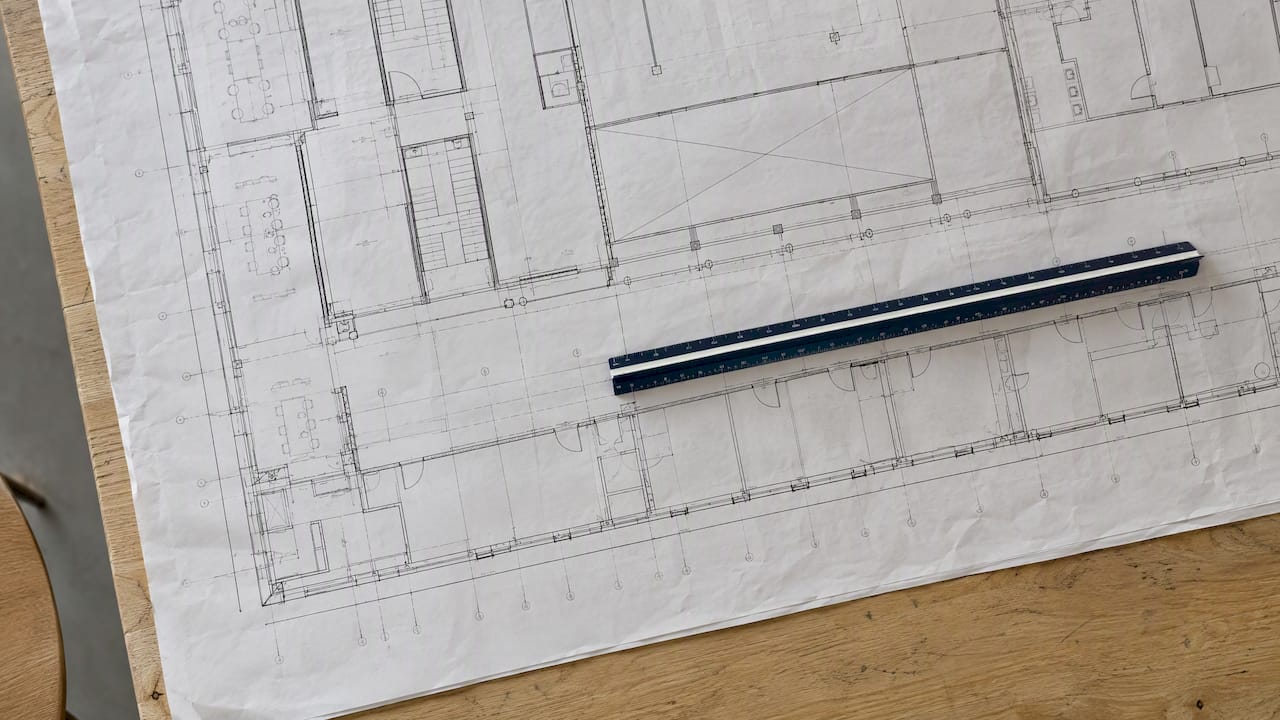
Scale ruler on a 2D construction plan

TL;DR

  • Automated takeoff differs from digital takeoff: digital takeoff is on-screen measuring by a person, automated takeoff detects and counts objects itself and hands over a draft.
  • A reliable workflow has six parts: clean drawing set, verified scale, defined scope, detection, review, export to the estimate.
  • Output quality depends on drawing quality, scope definition, local rate assumptions and estimator judgment, so treat every automated number as a draft to be reviewed.
  • Clean vector PDFs suit automation best. Poor scans, dense multi-trade sheets and details that depend on schedules and notes need the most manual attention.
  • The strongest setups record assumptions and link every quantity to its source on the sheet, so a reviewer can check it the way they would check a colleague’s work.

What 2D takeoff automation actually is

A quantity takeoff is the extraction of measurable quantities from drawings so they can be priced. The manual version, as an academic comparison of manual, BIM-based and AI-assisted takeoff describes it, involves reading the drawings, recording measurements, applying formulas, deducting openings and preparing bill of quantities figures. The same paper defines AI-assisted takeoff as the generation of draft quantities or detected objects from drawings, which the estimator then validates. The word “draft” carries the whole argument.

Three levels are worth keeping apart, because vendors and search results blur them.

Level Who finds the objects Who measures Typical output
Manual takeoff Estimator, on paper or print Estimator, with scale rule or planimeter Handwritten or spreadsheet quantities
Digital takeoff Estimator, on screen Software, from the estimator’s clicks Measured lengths, areas and counts
Automated takeoff Software detects symbols, lines and areas Software Draft quantities for review

Digital takeoff is faster than paper but still scales linearly with the number of sheets: twice the drawings, twice the clicking. Automation breaks that relationship for the repetitive part of the work, such as counting every instance of a fixture symbol across forty sheets. Judgment-heavy parts, such as deciding what a detail implies, remain with the estimator.

The term “2D” matters as well. The input here is a drawing, usually a PDF or CAD export, with no embedded object data. The software has to infer that a rectangle with an arc is a door. A BIM model, by contrast, already carries objects with properties, and quantities can be read from it directly. Many projects have both: a model for the design team and 2D sheets that are what the bidders actually receive. Our notes on quantities from the IFC model cover the model route, and the two approaches complement each other.

Which quantities can be automated

Not every quantity is equally suited. The distinction is between things the drawing shows geometrically and things it only implies.

Counts. Symbols repeated across sheets: doors, windows, fixtures, outlets, manholes, valves, light fittings. These are the classic automation target, since a symbol is a pattern and patterns repeat.

Lengths. Pipe runs, conduit, curbs, fence lines, wall centerlines, trench lengths. Detection works when line types are consistent and legends are respected. It struggles when several services share one corridor and the line styles are similar.

Areas. Floor areas, paving, roofing, ceiling and wall finishes, excavation footprints. Closed boundaries are straightforward; open or hatched regions with annotated exceptions are not.

Derived quantities. Volumes, wall areas net of openings, formwork, reinforcement weights. These need a height, thickness or schedule from elsewhere. The software can calculate once it has the inputs, but finding the inputs is a reading task spread over plans, sections, notes and specifications. This is where automation is weakest if it only looks at the plan view.

Openings deserve a special mention. A bill of quantities normally deducts door and window openings from wall area, and the deduction depends on real opening sizes, not nominal ones. Practical guidance on measuring a door opening shows how much the rough opening, the frame and the leaf can differ, which is exactly the sort of distinction a symbol count alone does not capture.

How to automate a 2D takeoff, step by step

The sequence below applies whatever tool you use. The order matters more than the software.

1. Assemble and clean the drawing set

Collect the current issue of every discipline sheet, the specifications, and any addenda. Confirm the revision on each sheet before anything is measured. Remove superseded sheets from the working set, because a detector will happily count objects on a drawing that was replaced last week.

File quality is decided here. A native vector PDF exported from CAD keeps lines and text as objects. A scan of a printout has only pixels, and every later step becomes less certain.

2. Verify the scale on every sheet

Scale is the most common silent failure. Titles say 1:100, but the PDF may have been printed to fit, or a sheet may contain details at different scales. Calibrate against a known dimension on each sheet, such as a gridline spacing or a dimensioned wall, and measure a second known dimension to confirm. Where a sheet carries several scales, calibrate each viewport separately.

3. Define the scope before detection

Decide which trades, systems and work packages the takeoff covers, and which are excluded or carried as allowances. The IJERT authors list scope definition among the factors that determine output quality, next to drawing quality, training data and local rate assumptions. A detector with no scope will return everything it recognizes, and the estimator then drowns in objects that were never part of the bid.

4. Run detection and measurement

Configure the item list to match your cost codes or bill of quantities structure, then let the software detect symbols, trace lines and close areas. Prefer tools that show each detection on the sheet, with a confidence indicator or at least a highlight, over those that return a total only. A total with no trace cannot be audited.

5. Review against the drawings

This is the step that makes automation safe and is covered in detail in the next section. Nothing should enter the estimate that a person has not at least spot-checked against the sheet.

6. Export to the estimate

Export quantities with their item codes, units and sheet references into the estimating system or spreadsheet. Keep the assumptions with the numbers: the scale used, the revision, the deductions applied, the waste factors. When the design changes, a takeoff with recorded assumptions can be updated. A takeoff with only totals has to be redone.

Checking automated quantities

The IJERT paper’s position is that AI should be treated as a reviewable support tool, not a replacement for estimators, because results depend on drawing quality, training data, scope definition, local rate assumptions and professional judgment. That is a sound basis for a review routine. A workable one has five checks.

  1. Scale check. Measure one known dimension per sheet on the output overlay. If it is off, everything downstream on that sheet is off by the same ratio.
  2. Revision check. Compare sheet revision letters against the issued drawing register. Confirm that addenda were applied.
  3. Omission check. Pick two or three item types and count them independently, for example by sampling one floor or one drawing area manually. Missed symbols are the typical omission, and a sample finds the rate.
  4. Reasonableness check. Compare totals with ratios you already know: concrete per square meter of slab, pipe length per lot, paint area per floor area. A number that is plausible on a ratio is not proven, but one that is far off is a flag.
  5. Cross-sheet check. Items that appear on both plans and schedules should agree. A door schedule with 84 entries and a plan count of 79 is a finding, not noise.

Land preparation and site work deserve particular care, since quantities there often hinge on regulatory setbacks and clearing limits rather than on what is drawn. A guide to land clearing buffers illustrates how constraints outside the drawing can change what has to be measured.

The point of the routine is not to distrust the software. It is to know your own error rate on your own kind of drawings, and to keep it where an owner or a senior estimator would accept it.

Drawing conditions that still need a human

Practitioner reports agree on the pattern: automation does best on clean vector PDFs and worse on dense commercial sheets, overlapping trades, poor scans, inconsistent symbols, and details whose meaning depends on schedules, notes, specifications or riser diagrams. These are practitioner observations, not a universal benchmark, and the right reading is a question for each firm: how does the tool perform on this trade, with this drawing condition, under this review process?

In practice that means the following situations call for a person to lead and the software to assist.

  • Scanned or photographed sets. Low-resolution lines merge, text is misread, scale drifts across the page.
  • Overlapping services. Mechanical, electrical and plumbing lines drawn on one sheet in similar styles.
  • Symbols that vary by designer. A legend that differs sheet to sheet, or no legend at all.
  • Meaning held in notes. “Typical unless noted”, “see schedule”, “as specification section”. The geometry is insufficient on its own.
  • Sections and details. Heights, thicknesses and build-ups are read from a different sheet than the plan being measured.
  • Field-dependent quantities. Where actual layout and control in the field matter, as in construction surveying, the drawing is an intent, not a measurement.

A sensible way to use the list is to sort a bid package before starting. Sheets that are clean and repetitive go to automation. Sheets that are dense or ambiguous are measured with a person leading. The sorting takes minutes and avoids the worst surprise, which is discovering at the end that a third of the automated output needs redoing.

Perspective: Why the review trail matters more than the speed

We build Yesper, an AI civil engineer for construction and infrastructure, and the first thing to understand about takeoff automation is that speed is the easy part. Customers report saving 50 to 95 percent of the time on quantity work, but the figure is only worth something if the result can be trusted by the person who signs the estimate.

That is why we design around traceability. Every quantity should point back to the place in the source it came from, and every assumption, whether a scale, a deduction rule or an interpretation of a note, should be written down so a reviewer can disagree with it. An estimator reviewing the output should be able to work the way they would review a colleague’s spreadsheet: follow the logic, find the one questionable assumption, correct it, and let the rest stand.

Perspective: why the review trail matters more than the speed — overview diagram

We also think the debate about 2D versus models is partly false. Bidders receive what the designer issues, which is often sheets. The practical goal is a process that takes drawings, specifications and, where available, models, and produces quantities in one comparable structure. Our notes on drawing quantity takeoffs for estimators and auditable BIM takeoffs set out how we handle each, and our view on keeping human sign-off with AI is that the estimator remains accountable, so the tool should be built for that.

One more point, on the economics of reading. Time spent on reading and re-reading drawings is a cost that rarely appears in a budget line. We tried to put a figure on it in the cost of reading your own drawings. Automation earns its place by reducing that cost without removing the reader.

Fitting takeoff automation into the estimating workflow

Takeoff is one stage in a chain: tender documents arrive, scope is extracted, quantities are measured, rates are applied, and the bid is assembled and checked. Automating one stage in isolation produces a faster step followed by the same bottleneck. Three connections are worth designing deliberately.

Upstream: tender documents. The scope that defines the takeoff lives in the specifications, addenda and tender instructions as much as in the drawings. Reading them for inclusions, exclusions and conflicts is a separate task from measuring. See our overview of tender document analysis for how that stage can be handled with human sign-off.

Downstream: pricing. Quantities become costs only through rates, and rate assumptions are local. The academic authors name local rate assumptions as a factor the human must own. Keep rates, waste and productivity in a separate, visible layer rather than baked into the takeoff.

Sideways: model-based costing. Where an IFC model exists, quantities can feed cost estimation directly, with limits that are worth understanding. We discuss them in 5D BIM estimation.

On the question of measured gains, treat vendor percentages with the same skepticism you would apply to any claim without a method. Figures such as “up to 90 percent faster” circulate widely, and they describe best cases on suitable drawings. A fairer way to establish your own number is to time a representative past bid both ways, then compare the quantities line by line, so you know both the time saved and the discrepancy rate.

Choosing an approach: A short decision guide

Situation Likely best approach
Repetitive counts across many sheets, clean vector PDFs Automated detection with sample review
Mixed-quality set with some scans Automation on clean sheets, manual on the rest
Dense multi-trade sheets, heavy notes Estimator-led digital takeoff, automation for counts only
Model supplied with the tender Quantities from the model, cross-checked against sheets
Many tenders to compare in different formats Structured extraction into one comparable format

The common thread is that automation is a way of allocating attention. It frees it from the repeatable and directs it to what is ambiguous.

Where Yesper fits

Yesper works inside your projects as an AI civil engineer: it searches project documents, produces quantity takeoffs from drawings and BIM, flags errors, and writes down its assumptions so your team can review them. Each quantity carries source verification, and your estimators keep the final decision. If your team is looking at how to bring takeoff and other document-heavy work into a daily workflow, see how Yesper works for construction teams or read about what an AI civil engineer is.

What is the difference between digital takeoff and automated takeoff?

Digital takeoff moves measuring onto a screen, but a person still identifies and clicks each item. Automated takeoff detects and counts objects or traces lines and areas by itself and produces a draft for the estimator to validate. The practical effect is that effort no longer grows in step with the number of sheets for repetitive items.

Can 2D takeoff automation replace an estimator?

No. Output depends on drawing quality, scope definition, local rate assumptions and professional judgment, so the estimator remains the reviewer and the accountable party. The realistic change is that the estimator spends more time checking and interpreting and less on repetitive measuring.

Which drawings work best for automated takeoff?

Clean vector PDFs exported from CAD, with consistent symbols and a clear legend, give the best results. Scans, dense multi-trade sheets and details that depend on schedules or notes need more manual work. Sorting the sheets by condition before you start tells you where to rely on automation.

How do I check that an automated takeoff is correct?

Verify the scale on each sheet, confirm revisions against the drawing register, independently count a sample of item types, compare totals with known ratios, and reconcile plan counts with schedules. Keep a record of the assumptions used so the check can be repeated after a design change.

This post was written with AI assistance and published by Yesper. General information, not professional advice: requirements vary by project and jurisdiction, and the professional responsible for the project decides what applies. Spotted an error? Write to benjamin@yesper.ai.

Benjamin Glaser Co-founder at Yesper. Writes about AI and the industry that builds the world. benjamin@yesper.ai

Yesper is the AI civil engineer for construction and infrastructure. AFRY, COWI, NRC Group and other Nordic firms use it to halve the time on a study, rerun calculations in minutes, and catch errors that would otherwise slip through. Get in touch if you'd like to see what it can do for you.

Book demo