Meeting minutes automation records a meeting, transcribes it, and turns the transcript into a searchable summary with action items, using pipelines that pair speech-to-text with retrieval-augmented systems such as those described in the AutoMeet proof-of-concept study. The result is a faster draft, not a finished document: every automated summary still needs a human to check names, figures, and commitments before anyone treats it as the record of what happened.
In short
01
The pipeline runs in a fixed sequence: a recording method captures the audio, a transcription engine turns it into text with speaker labels, a summarizer condenses that text into decisions and tasks, and a retrieval layer makes the whole archive searchable. The AutoMeet proof-of-concept describes exactly this chain, from capture through a retrieval-augmented generation (RAG) chatbot that answers questions against stored minutes. Recording can happen through a virtual meeting participant, a browser extension, or a manual file upload, and each method carries its own consent and audio-quality tradeoffs.
02
Transcription accuracy is the first filter, and it degrades fastest on technical vocabulary, cross-talk, and poor room acoustics, a limitation practitioners consistently flag as the main technical ceiling on automated minutes. A tool that transcribes clean, single-speaker audio well can still produce unreliable output in a crowded site trailer or a noisy conference room, so testing on your actual meeting conditions matters more than a vendor’s demo reel.
Beyond accuracy, evaluate:
Pro Tip: Run a two-week pilot with your noisiest recurring meeting before rolling a tool out company-wide; a system that handles a quiet one-on-one well can still fail on a packed site coordination call.
Consent and privacy design are not cosmetic. The AutoMeet study found that data security was the most frequent user concern, and that acceptance improved sharply when deletion and manual approval were built into the workflow rather than added as an afterthought.
03
The steps below turn the pipeline above into a routine any team can run without custom engineering.
04
A summary is only useful if it is structured the same way every time. Microsoft’s guidance on converting Teams transcripts into minutes recommends matching the template to the meeting type, since a stand-up and a board meeting need different levels of detail from the same underlying transcript.
Governance-heavy meetings need one more layer: a field recording who reviewed the AI draft and when, so the approval trail survives an audit.
05
Automated minutes fail quietly when no one checks them, which is why every credible pipeline design treats human review as mandatory rather than optional. The AutoMeet proof-of-concept built manual approval into the workflow before any summary reached a searchable database, and reported that this step, paired with deletion of raw recordings after processing, was central to user acceptance.
The AutoMeet proof-of-concept trial found that meeting minute creation rates increased notably when automation and search were paired together, a sign that the bottleneck for most teams is not willingness but effort. That gain only holds when the review step is actually enforced, not skipped under deadline pressure.
06
Automation earns its keep in structured, recurring meetings: stand-ups, project reviews, and status calls where the format repeats and the stakes of a missed nuance are low. It is a weaker fit for legally binding proceedings, contract negotiations, or disputes, where a misheard figure or a dropped qualifier carries real consequence and extra verification controls are non-negotiable. Before scaling a rollout, track three numbers: time saved per meeting, transcription accuracy against a spot-checked sample, and the share of action items actually closed on time.
07
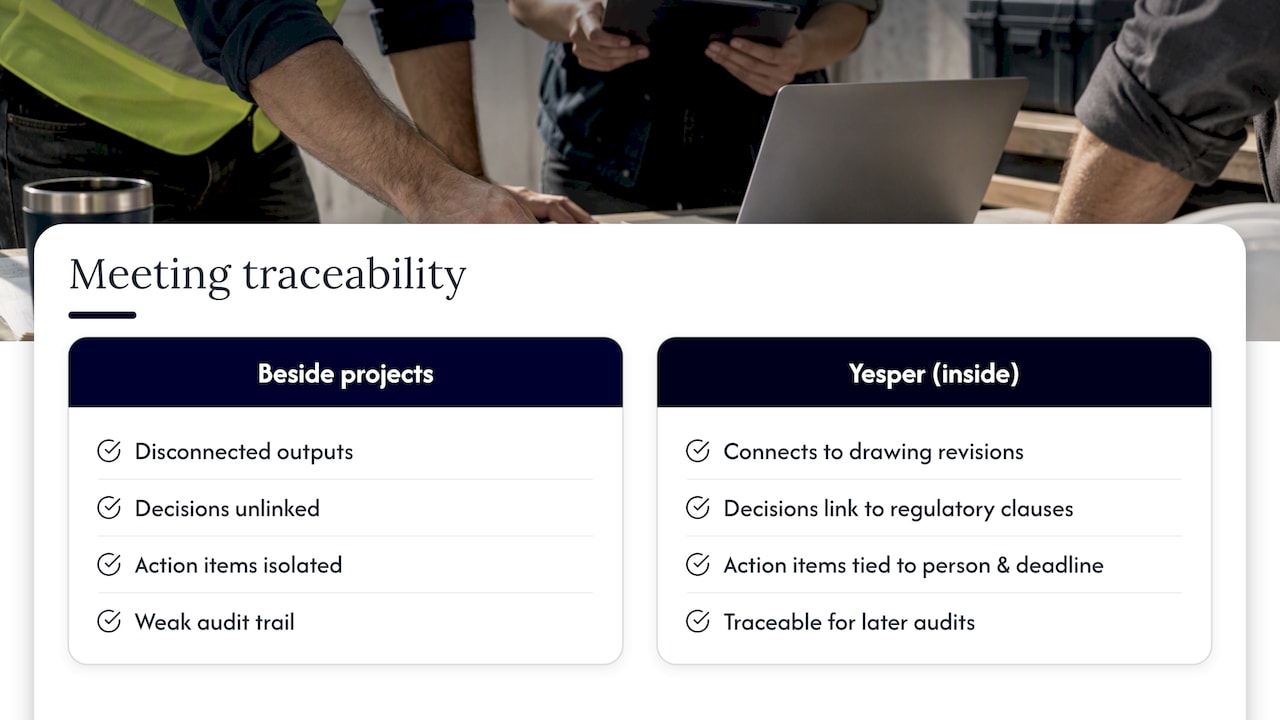
Construction and infrastructure meetings rarely stand alone. A site coordination call references a drawing revision, a decision list ties back to a regulatory clause, and an action item often needs a specific person on the project team to close it against a deadline that shows up in three other documents. Yesper works inside those projects rather than beside them, which means meeting outputs can connect to the same regulatory and document context Yesper already handles for tender review and compliance automation, with assumptions written down the way you would expect from a colleague’s draft, not a black box.

That traceability matters most when a decision made in a meeting has to survive an audit months later, the same discipline covered in Yesper’s guidance on construction safety compliance and document control. To see how Yesper fits into a construction organization’s daily workflow, visit Yesper’s site or read more about the company.
FAQ
The 40/20/40 rule splits the effort around a meeting into 40 percent preparation, 20 percent the meeting itself, and 40 percent follow-up. Automation tools speed up the final stage by turning a transcript into a summary and action list, but the preparation and follow-through still require deliberate effort from the team.
A general-purpose model like ChatGPT can summarize a pasted transcript into a rough set of minutes, but it lacks built-in recording, speaker attribution, and the privacy filtering that a dedicated pipeline such as AutoMeet is designed around. For consistent formatting and traceability, purpose-built tools and templates generally outperform an ad hoc prompt.
Yes: Microsoft’s Copilot for Word can convert a Teams transcript into a structured template covering attendees, agenda, decisions, and action items, as described in Microsoft’s own guidance. The template can be adjusted to match the meeting type, from a brief stand-up format to a fuller project-meeting layout.
There is no single best tool for every context. General office meetings are well served by transcript-to-template workflows like the one Microsoft documents for Word, while construction and infrastructure teams handling regulatory or technical content benefit from a domain-aware platform such as Yesper that connects meeting outputs to the same document control and compliance workflows already in place on the project.

This post was written with AI assistance and published by Yesper. General information, not professional advice: requirements vary by project and jurisdiction, and the professional responsible for the project decides what applies. Spotted an error? Write to benjamin@yesper.ai.
Get news and articles in your inbox.
Yesper is the AI civil engineer for construction and infrastructure. AFRY, COWI, NRC Group and other Nordic firms use it to halve the time on a study, rerun calculations in minutes, and catch errors that would otherwise slip through. Get in touch if you'd like to see what it can do for you.
Book demo